use knowledge and ground truth to improve reliability of LMM generated contents
Large language models can encode a wealth of semantic knowledge about the world. Such knowledge could be extremely useful to robots aiming to act upon high-level, temporally extended instructions expressed in natural language. However, a significant weakness of language models is that they lack real-world experience, which makes it difficult to leverage them for decision making within a given embodiment. For example, asking a language model to describe how to clean a spill might result in a reasonable narrative, but it may not be applicable to a particular agent, such as a robot, that needs to perform this task in a particular environment. We propose to provide real-world grounding by means of pretrained skills, which are used to constrain the model to propose natural language actions that are both feasible and contextually appropriate. The robot can act as the language model's "hands and eyes," while the language model supplies high-level semantic knowledge about the task. We show how low-level skills can be combined with large language models so that the language model provides high-level knowledge about the procedures for performing complex and temporally-extended instructions, while value functions associated with these skills provide the grounding necessary to connect this knowledge to a particular physical environment. We evaluate our method on a number of real-world robotic tasks, where we show the need for real-world grounding and that this approach is capable of completing long-horizon, abstract, natural language instructions on a mobile manipulator. The project's website and the video can be found at https://say-can.github.io/
- toc: true
- badges: true
- comments: true
- categories: [jupyter]
- image: images/chart-preview.png
Copyright 2022 Google LLC. SPDX-License-Identifier: Apache-2.0
Licensed under the Apache License, Version 2.0 (the "License"); you may not use this file except in compliance with the License. You may obtain a copy of the License at
https://www.apache.org/licenses/LICENSE-2.0
Unless required by applicable law or agreed to in writing, software distributed under the License is distributed on an "AS IS" BASIS, WITHOUT WARRANTIES OR CONDITIONS OF ANY KIND, either express or implied. See the License for the specific language governing permissions and limitations under the License.
SayCan on a Robot Pick and Place Tabletop Environment
SayCan is an algorithm that grounds large language models with robotic affordances for long-horizon planning. Given a set of low-level robotic skills (e.g., "put the green block in the red bowl") and a high-level instruction (e.g., "stack all the blocks"), it scores what a language model believes will help forward the high-level instruction and scores what a robotic affordance model believes is possible. Together these give a task that is useful and possible and the robot executes the command.

This colab runs an example of SayCan for a pick and place robot on a table top.
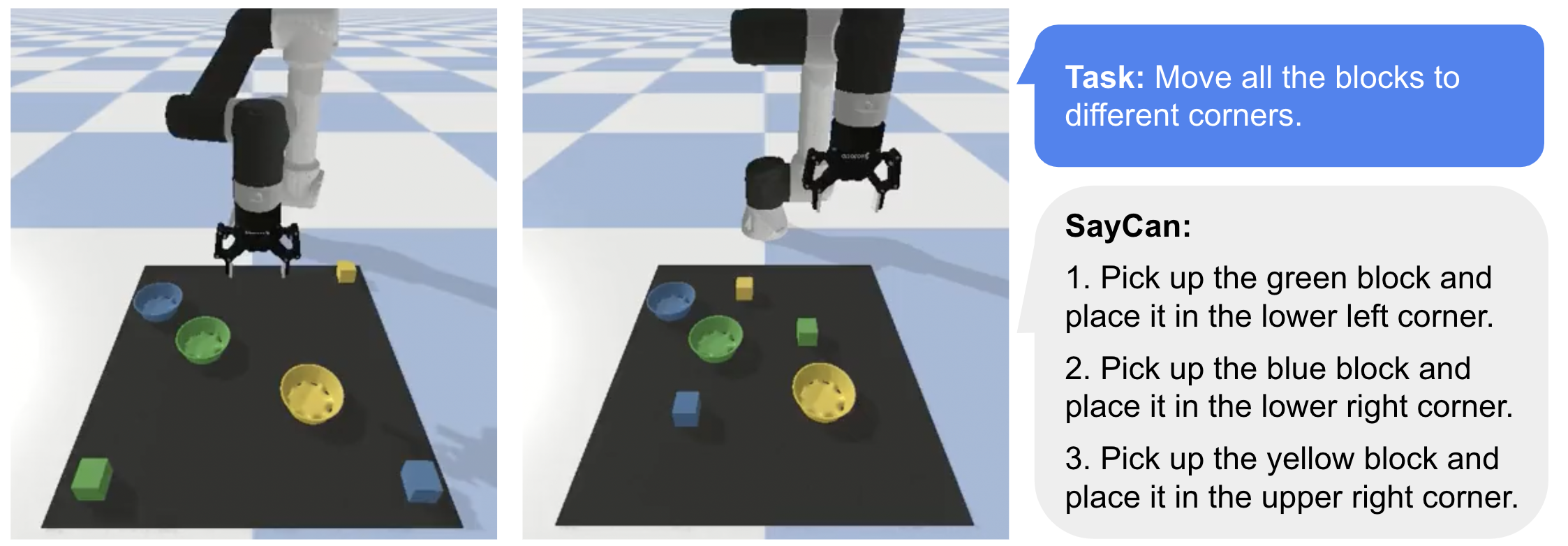
Models used: GPT-3 (InstructGPT), CLIP (ViT-B/32), ViLD, and CLIPort variant (Transporter Nets)
Quick Start:
Step 1. Register for an OpenAI API key to use GPT-3 (there's a free trial) and enter it below
Step 2. Menu > Change runtime type > Hardware accelerator > "GPU"
Step 3. Menu > Runtime > Run all
openai_api_key = "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"
ENGINE = "text-davinci-002"  # "text-ada-001"
# Note for scoring model, due to limitations of the GPT-3 api, each option
# requires a separate call and can be expensive. Recommend iterating with ada.
Setup
This does a few things:
- Installs dependencies: CLIP, PyTorch, etc.
- Downloads demo videos, models, and cached LLM calls
#@markdown

!pip install ftfy regex tqdm fvcore imageio==2.4.1 imageio-ffmpeg==0.4.5
!pip install git+https://github.com/openai/CLIP.git
!pip install -U --no-cache-dir gdown --pre
!pip install pybullet moviepy
!pip install flax==0.5.3
!pip install openai
!pip install easydict
!pip install imageio-ffmpeg
# !pip install tensorflow==2.7.0  # If error: UNIMPLEMENTED: DNN library is not found.

import collections
import datetime
import os
import random
import threading
import time

import cv2  # Used by ViLD.
import clip
from easydict import EasyDict
import flax
from flax import linen as nn
from flax.training import checkpoints
from flax.metrics import tensorboard
import imageio
from heapq import nlargest
import IPython
import jax
import jax.numpy as jnp
import matplotlib.pyplot as plt
from moviepy.editor import ImageSequenceClip
import numpy as np
import openai
import optax
import pickle
from PIL import Image
import pybullet
import pybullet_data
import tensorflow.compat.v1 as tf
import torch
from tqdm import tqdm

#Download PyBullet assets.
if not os.path.exists('ur5e/ur5e.urdf'):
  !gdown --id 1Cc_fDSBL6QiDvNT4dpfAEbhbALSVoWcc
  !gdown --id 1yOMEm-Zp_DL3nItG9RozPeJAmeOldekX
  !gdown --id 1GsqNLhEl9dd4Mc3BM0dX3MibOI1FVWNM
  !unzip ur5e.zip
  !unzip robotiq_2f_85.zip
  !unzip bowl.zip

# ViLD pretrained model weights.
!gsutil cp -r gs://cloud-tpu-checkpoints/detection/projects/vild/colab/image_path_v2 ./

%load_ext tensorboard

openai.api_key = openai_api_key

# Show useful GPU info.
!nvidia-smi

# Show if JAX is using GPU.
from jax.lib import xla_bridge
print(xla_bridge.get_backend().platform)
Setup Environment
Define PyBullet-based environment with a UR5e and 2-finger gripper
#@markdown Global constants: pick and place objects, colors, workspace bounds

PICK_TARGETS = {
  "blue block": None,
  "red block": None,
  "green block": None,
  "yellow block": None,
}

COLORS = {
    "blue":   (78/255,  121/255, 167/255, 255/255),
    "red":    (255/255,  87/255,  89/255, 255/255),
    "green":  (89/255,  169/255,  79/255, 255/255),
    "yellow": (237/255, 201/255,  72/255, 255/255),
}

PLACE_TARGETS = {
  "blue block": None,
  "red block": None,
  "green block": None,
  "yellow block": None,

  "blue bowl": None,
  "red bowl": None,
  "green bowl": None,
  "yellow bowl": None,

  "top left corner":     (-0.3 + 0.05, -0.2 - 0.05, 0),
  "top right corner":    (0.3 - 0.05,  -0.2 - 0.05, 0),
  "middle":              (0,           -0.5,        0),
  "bottom left corner":  (-0.3 + 0.05, -0.8 + 0.05, 0),
  "bottom right corner": (0.3 - 0.05,  -0.8 + 0.05, 0),
}

PIXEL_SIZE = 0.00267857
BOUNDS = np.float32([[-0.3, 0.3], [-0.8, -0.2], [0, 0.15]])  # X Y Z
#@markdown Gripper (Robotiq 2F85) code

class Robotiq2F85:
  """Gripper handling for Robotiq 2F85."""

  def __init__(self, robot, tool):
    self.robot = robot
    self.tool = tool
    pos = [0.1339999999999999, -0.49199999999872496, 0.5]
    rot = pybullet.getQuaternionFromEuler([np.pi, 0, np.pi])
    urdf = "robotiq_2f_85/robotiq_2f_85.urdf"
    self.body = pybullet.loadURDF(urdf, pos, rot)
    self.n_joints = pybullet.getNumJoints(self.body)
    self.activated = False

    # Connect gripper base to robot tool.
    pybullet.createConstraint(self.robot, tool, self.body, 0, jointType=pybullet.JOINT_FIXED, jointAxis=[0, 0, 0], parentFramePosition=[0, 0, 0], childFramePosition=[0, 0, -0.07], childFrameOrientation=pybullet.getQuaternionFromEuler([0, 0, np.pi / 2]))

    # Set friction coefficients for gripper fingers.
    for i in range(pybullet.getNumJoints(self.body)):
      pybullet.changeDynamics(self.body, i, lateralFriction=10.0, spinningFriction=1.0, rollingFriction=1.0, frictionAnchor=True)

    # Start thread to handle additional gripper constraints.
    self.motor_joint = 1
    self.constraints_thread = threading.Thread(target=self.step)
    self.constraints_thread.daemon = True
    self.constraints_thread.start()

  # Control joint positions by enforcing hard contraints on gripper behavior.
  # Set one joint as the open/close motor joint (other joints should mimic).
  def step(self):
    while True:
      try:
        currj = [pybullet.getJointState(self.body, i)[0] for i in range(self.n_joints)]
        indj = [6, 3, 8, 5, 10]
        targj = [currj[1], -currj[1], -currj[1], currj[1], currj[1]]
        pybullet.setJointMotorControlArray(self.body, indj, pybullet.POSITION_CONTROL, targj, positionGains=np.ones(5))
      except:
        return
      time.sleep(0.001)

  # Close gripper fingers.
  def activate(self):
    pybullet.setJointMotorControl2(self.body, self.motor_joint, pybullet.VELOCITY_CONTROL, targetVelocity=1, force=10)
    self.activated = True

  # Open gripper fingers.
  def release(self):
    pybullet.setJointMotorControl2(self.body, self.motor_joint, pybullet.VELOCITY_CONTROL, targetVelocity=-1, force=10)
    self.activated = False

  # If activated and object in gripper: check object contact.
  # If activated and nothing in gripper: check gripper contact.
  # If released: check proximity to surface (disabled).
  def detect_contact(self):
    obj, _, ray_frac = self.check_proximity()
    if self.activated:
      empty = self.grasp_width() < 0.01
      cbody = self.body if empty else obj
      if obj == self.body or obj == 0:
        return False
      return self.external_contact(cbody)
  #   else:
  #     return ray_frac < 0.14 or self.external_contact()

  # Return if body is in contact with something other than gripper
  def external_contact(self, body=None):
    if body is None:
      body = self.body
    pts = pybullet.getContactPoints(bodyA=body)
    pts = [pt for pt in pts if pt[2] != self.body]
    return len(pts) > 0  # pylint: disable=g-explicit-length-test

  def check_grasp(self):
    while self.moving():
      time.sleep(0.001)
    success = self.grasp_width() > 0.01
    return success

  def grasp_width(self):
    lpad = np.array(pybullet.getLinkState(self.body, 4)[0])
    rpad = np.array(pybullet.getLinkState(self.body, 9)[0])
    dist = np.linalg.norm(lpad - rpad) - 0.047813
    return dist

  def check_proximity(self):
    ee_pos = np.array(pybullet.getLinkState(self.robot, self.tool)[0])
    tool_pos = np.array(pybullet.getLinkState(self.body, 0)[0])
    vec = (tool_pos - ee_pos) / np.linalg.norm((tool_pos - ee_pos))
    ee_targ = ee_pos + vec
    ray_data = pybullet.rayTest(ee_pos, ee_targ)[0]
    obj, link, ray_frac = ray_data[0], ray_data[1], ray_data[2]
    return obj, link, ray_frac
#@markdown Gym-style environment code

class PickPlaceEnv():

  def __init__(self):
    self.dt = 1/480
    self.sim_step = 0

    # Configure and start PyBullet.
    # python3 -m pybullet_utils.runServer
    # pybullet.connect(pybullet.SHARED_MEMORY)  # pybullet.GUI for local GUI.
    pybullet.connect(pybullet.DIRECT)  # pybullet.GUI for local GUI.
    pybullet.configureDebugVisualizer(pybullet.COV_ENABLE_GUI, 0)
    pybullet.setPhysicsEngineParameter(enableFileCaching=0)
    assets_path = os.path.dirname(os.path.abspath(""))
    pybullet.setAdditionalSearchPath(assets_path)
    pybullet.setAdditionalSearchPath(pybullet_data.getDataPath())
    pybullet.setTimeStep(self.dt)

    self.home_joints = (np.pi / 2, -np.pi / 2, np.pi / 2, -np.pi / 2, 3 * np.pi / 2, 0)  # Joint angles: (J0, J1, J2, J3, J4, J5).
    self.home_ee_euler = (np.pi, 0, np.pi)  # (RX, RY, RZ) rotation in Euler angles.
    self.ee_link_id = 9  # Link ID of UR5 end effector.
    self.tip_link_id = 10  # Link ID of gripper finger tips.
    self.gripper = None

  def reset(self, config):
    pybullet.resetSimulation(pybullet.RESET_USE_DEFORMABLE_WORLD)
    pybullet.setGravity(0, 0, -9.8)
    self.cache_video = []

    # Temporarily disable rendering to load URDFs faster.
    pybullet.configureDebugVisualizer(pybullet.COV_ENABLE_RENDERING, 0)

    # Add robot.
    pybullet.loadURDF("plane.urdf", [0, 0, -0.001])
    self.robot_id = pybullet.loadURDF("ur5e/ur5e.urdf", [0, 0, 0], flags=pybullet.URDF_USE_MATERIAL_COLORS_FROM_MTL)
    self.ghost_id = pybullet.loadURDF("ur5e/ur5e.urdf", [0, 0, -10])  # For forward kinematics.
    self.joint_ids = [pybullet.getJointInfo(self.robot_id, i) for i in range(pybullet.getNumJoints(self.robot_id))]
    self.joint_ids = [j[0] for j in self.joint_ids if j[2] == pybullet.JOINT_REVOLUTE]

    # Move robot to home configuration.
    for i in range(len(self.joint_ids)):
      pybullet.resetJointState(self.robot_id, self.joint_ids[i], self.home_joints[i])

    # Add gripper.
    if self.gripper is not None:
      while self.gripper.constraints_thread.is_alive():
        self.constraints_thread_active = False
    self.gripper = Robotiq2F85(self.robot_id, self.ee_link_id)
    self.gripper.release()

    # Add workspace.
    plane_shape = pybullet.createCollisionShape(pybullet.GEOM_BOX, halfExtents=[0.3, 0.3, 0.001])
    plane_visual = pybullet.createVisualShape(pybullet.GEOM_BOX, halfExtents=[0.3, 0.3, 0.001])
    plane_id = pybullet.createMultiBody(0, plane_shape, plane_visual, basePosition=[0, -0.5, 0])
    pybullet.changeVisualShape(plane_id, -1, rgbaColor=[0.2, 0.2, 0.2, 1.0])

    # Load objects according to config.
    self.config = config
    self.obj_name_to_id = {}
    obj_names = list(self.config["pick"]) + list(self.config["place"])
    obj_xyz = np.zeros((0, 3))
    for obj_name in obj_names:
      if ("block" in obj_name) or ("bowl" in obj_name):

        # Get random position 15cm+ from other objects.
        while True:
          rand_x = np.random.uniform(BOUNDS[0, 0] + 0.1, BOUNDS[0, 1] - 0.1)
          rand_y = np.random.uniform(BOUNDS[1, 0] + 0.1, BOUNDS[1, 1] - 0.1)
          rand_xyz = np.float32([rand_x, rand_y, 0.03]).reshape(1, 3)
          if len(obj_xyz) == 0:
            obj_xyz = np.concatenate((obj_xyz, rand_xyz), axis=0)
            break
          else:
            nn_dist = np.min(np.linalg.norm(obj_xyz - rand_xyz, axis=1)).squeeze()
            if nn_dist > 0.15:
              obj_xyz = np.concatenate((obj_xyz, rand_xyz), axis=0)
              break

        object_color = COLORS[obj_name.split(" ")[0]]
        object_type = obj_name.split(" ")[1]
        object_position = rand_xyz.squeeze()
        if object_type == "block":
          object_shape = pybullet.createCollisionShape(pybullet.GEOM_BOX, halfExtents=[0.02, 0.02, 0.02])
          object_visual = pybullet.createVisualShape(pybullet.GEOM_BOX, halfExtents=[0.02, 0.02, 0.02])
          object_id = pybullet.createMultiBody(0.01, object_shape, object_visual, basePosition=object_position)
        elif object_type == "bowl":
          object_position[2] = 0
          object_id = pybullet.loadURDF("bowl/bowl.urdf", object_position, useFixedBase=1)
        pybullet.changeVisualShape(object_id, -1, rgbaColor=object_color)
        self.obj_name_to_id[obj_name] = object_id

    # Re-enable rendering.
    pybullet.configureDebugVisualizer(pybullet.COV_ENABLE_RENDERING, 1)

    for _ in range(200):
      pybullet.stepSimulation()
    return self.get_observation()

  def servoj(self, joints):
    """Move to target joint positions with position control."""
    pybullet.setJointMotorControlArray(
      bodyIndex=self.robot_id,
      jointIndices=self.joint_ids,
      controlMode=pybullet.POSITION_CONTROL,
      targetPositions=joints,
      positionGains=[0.01]*6)

  def movep(self, position):
    """Move to target end effector position."""
    joints = pybullet.calculateInverseKinematics(
        bodyUniqueId=self.robot_id,
        endEffectorLinkIndex=self.tip_link_id,
        targetPosition=position,
        targetOrientation=pybullet.getQuaternionFromEuler(self.home_ee_euler),
        maxNumIterations=100)
    self.servoj(joints)

  def step(self, action=None):
    """Do pick and place motion primitive."""
    pick_xyz, place_xyz = action["pick"].copy(), action["place"].copy()

    # Set fixed primitive z-heights.
    hover_xyz = pick_xyz.copy() + np.float32([0, 0, 0.2])
    pick_xyz[2] = 0.03
    place_xyz[2] = 0.15

    # Move to object.
    ee_xyz = np.float32(pybullet.getLinkState(self.robot_id, self.tip_link_id)[0])
    while np.linalg.norm(hover_xyz - ee_xyz) > 0.01:
      self.movep(hover_xyz)
      self.step_sim_and_render()
      ee_xyz = np.float32(pybullet.getLinkState(self.robot_id, self.tip_link_id)[0])
    while np.linalg.norm(pick_xyz - ee_xyz) > 0.01:
      self.movep(pick_xyz)
      self.step_sim_and_render()
      ee_xyz = np.float32(pybullet.getLinkState(self.robot_id, self.tip_link_id)[0])

    # Pick up object.
    self.gripper.activate()
    for _ in range(240):
      self.step_sim_and_render()
    while np.linalg.norm(hover_xyz - ee_xyz) > 0.01:
      self.movep(hover_xyz)
      self.step_sim_and_render()
      ee_xyz = np.float32(pybullet.getLinkState(self.robot_id, self.tip_link_id)[0])

    # Move to place location.
    while np.linalg.norm(place_xyz - ee_xyz) > 0.01:
      self.movep(place_xyz)
      self.step_sim_and_render()
      ee_xyz = np.float32(pybullet.getLinkState(self.robot_id, self.tip_link_id)[0])

    # Place down object.
    while (not self.gripper.detect_contact()) and (place_xyz[2] > 0.03):
      place_xyz[2] -= 0.001
      self.movep(place_xyz)
      for _ in range(3):
        self.step_sim_and_render()
    self.gripper.release()
    for _ in range(240):
      self.step_sim_and_render()
    place_xyz[2] = 0.2
    ee_xyz = np.float32(pybullet.getLinkState(self.robot_id, self.tip_link_id)[0])
    while np.linalg.norm(place_xyz - ee_xyz) > 0.01:
      self.movep(place_xyz)
      self.step_sim_and_render()
      ee_xyz = np.float32(pybullet.getLinkState(self.robot_id, self.tip_link_id)[0])
    place_xyz = np.float32([0, -0.5, 0.2])
    while np.linalg.norm(place_xyz - ee_xyz) > 0.01:
      self.movep(place_xyz)
      self.step_sim_and_render()
      ee_xyz = np.float32(pybullet.getLinkState(self.robot_id, self.tip_link_id)[0])

    observation = self.get_observation()
    reward = self.get_reward()
    done = False
    info = {}
    return observation, reward, done, info

  def set_alpha_transparency(self, alpha: float) -> None:
    for id in range(20):
      visual_shape_data = pybullet.getVisualShapeData(id)
      for i in range(len(visual_shape_data)):
        object_id, link_index, _, _, _, _, _, rgba_color = visual_shape_data[i]
        rgba_color = list(rgba_color[0:3]) +  [alpha]
        pybullet.changeVisualShape(
            self.robot_id, linkIndex=i, rgbaColor=rgba_color)
        pybullet.changeVisualShape(
            self.gripper.body, linkIndex=i, rgbaColor=rgba_color)

  def step_sim_and_render(self):
    pybullet.stepSimulation()
    self.sim_step += 1

    # Render current image at 8 FPS.
    if self.sim_step % 60 == 0:
      self.cache_video.append(self.get_camera_image())

  def get_camera_image(self):
    image_size = (240, 240)
    intrinsics = (120., 0, 120., 0, 120., 120., 0, 0, 1)
    color, _, _, _, _ = env.render_image(image_size, intrinsics)
    return color

  def get_camera_image_top(self,
                           image_size=(240, 240),
                           intrinsics=(2000., 0, 2000., 0, 2000., 2000., 0, 0, 1),
                           position=(0, -0.5, 5),
                           orientation=(0, np.pi, -np.pi / 2),
                           zrange=(0.01, 1.),
                           set_alpha=True):
    set_alpha and self.set_alpha_transparency(0)
    color, _, _, _, _ = env.render_image_top(image_size,
                                             intrinsics,
                                             position,
                                             orientation,
                                             zrange)
    set_alpha and self.set_alpha_transparency(1)
    return color

  def get_reward(self):
    return 0  # TODO: check did the robot follow text instructions?

  def get_observation(self):
    observation = {}

    # Render current image.
    color, depth, position, orientation, intrinsics = self.render_image()

    # Get heightmaps and colormaps.
    points = self.get_pointcloud(depth, intrinsics)
    position = np.float32(position).reshape(3, 1)
    rotation = pybullet.getMatrixFromQuaternion(orientation)
    rotation = np.float32(rotation).reshape(3, 3)
    transform = np.eye(4)
    transform[:3, :] = np.hstack((rotation, position))
    points = self.transform_pointcloud(points, transform)
    heightmap, colormap, xyzmap = self.get_heightmap(points, color, BOUNDS, PIXEL_SIZE)

    observation["image"] = colormap
    observation["xyzmap"] = xyzmap
    observation["pick"] = list(self.config["pick"])
    observation["place"] = list(self.config["place"])
    return observation

  def render_image(self, image_size=(720, 720), intrinsics=(360., 0, 360., 0, 360., 360., 0, 0, 1)):

    # Camera parameters.
    position = (0, -0.85, 0.4)
    orientation = (np.pi / 4 + np.pi / 48, np.pi, np.pi)
    orientation = pybullet.getQuaternionFromEuler(orientation)
    zrange = (0.01, 10.)
    noise=True

    # OpenGL camera settings.
    lookdir = np.float32([0, 0, 1]).reshape(3, 1)
    updir = np.float32([0, -1, 0]).reshape(3, 1)
    rotation = pybullet.getMatrixFromQuaternion(orientation)
    rotm = np.float32(rotation).reshape(3, 3)
    lookdir = (rotm @ lookdir).reshape(-1)
    updir = (rotm @ updir).reshape(-1)
    lookat = position + lookdir
    focal_len = intrinsics[0]
    znear, zfar = (0.01, 10.)
    viewm = pybullet.computeViewMatrix(position, lookat, updir)
    fovh = (image_size[0] / 2) / focal_len
    fovh = 180 * np.arctan(fovh) * 2 / np.pi

    # Notes: 1) FOV is vertical FOV 2) aspect must be float
    aspect_ratio = image_size[1] / image_size[0]
    projm = pybullet.computeProjectionMatrixFOV(fovh, aspect_ratio, znear, zfar)

    # Render with OpenGL camera settings.
    _, _, color, depth, segm = pybullet.getCameraImage(
        width=image_size[1],
        height=image_size[0],
        viewMatrix=viewm,
        projectionMatrix=projm,
        shadow=1,
        flags=pybullet.ER_SEGMENTATION_MASK_OBJECT_AND_LINKINDEX,
        renderer=pybullet.ER_BULLET_HARDWARE_OPENGL)

    # Get color image.
    color_image_size = (image_size[0], image_size[1], 4)
    color = np.array(color, dtype=np.uint8).reshape(color_image_size)
    color = color[:, :, :3]  # remove alpha channel
    if noise:
      color = np.int32(color)
      color += np.int32(np.random.normal(0, 3, color.shape))
      color = np.uint8(np.clip(color, 0, 255))

    # Get depth image.
    depth_image_size = (image_size[0], image_size[1])
    zbuffer = np.float32(depth).reshape(depth_image_size)
    depth = (zfar + znear - (2 * zbuffer - 1) * (zfar - znear))
    depth = (2 * znear * zfar) / depth
    if noise:
      depth += np.random.normal(0, 0.003, depth.shape)

    intrinsics = np.float32(intrinsics).reshape(3, 3)
    return color, depth, position, orientation, intrinsics

  def render_image_top(self,
                       image_size=(240, 240),
                       intrinsics=(2000., 0, 2000., 0, 2000., 2000., 0, 0, 1),
                       position=(0, -0.5, 5),
                       orientation=(0, np.pi, -np.pi / 2),
                       zrange=(0.01, 1.)):

    # Camera parameters.
    orientation = pybullet.getQuaternionFromEuler(orientation)
    noise=True

    # OpenGL camera settings.
    lookdir = np.float32([0, 0, 1]).reshape(3, 1)
    updir = np.float32([0, -1, 0]).reshape(3, 1)
    rotation = pybullet.getMatrixFromQuaternion(orientation)
    rotm = np.float32(rotation).reshape(3, 3)
    lookdir = (rotm @ lookdir).reshape(-1)
    updir = (rotm @ updir).reshape(-1)
    lookat = position + lookdir
    focal_len = intrinsics[0]
    znear, zfar = (0.01, 10.)
    viewm = pybullet.computeViewMatrix(position, lookat, updir)
    fovh = (image_size[0] / 2) / focal_len
    fovh = 180 * np.arctan(fovh) * 2 / np.pi

    # Notes: 1) FOV is vertical FOV 2) aspect must be float
    aspect_ratio = image_size[1] / image_size[0]
    projm = pybullet.computeProjectionMatrixFOV(fovh, aspect_ratio, znear, zfar)

    # Render with OpenGL camera settings.
    _, _, color, depth, segm = pybullet.getCameraImage(
        width=image_size[1],
        height=image_size[0],
        viewMatrix=viewm,
        projectionMatrix=projm,
        shadow=1,
        flags=pybullet.ER_SEGMENTATION_MASK_OBJECT_AND_LINKINDEX,
        renderer=pybullet.ER_BULLET_HARDWARE_OPENGL)

    # Get color image.
    color_image_size = (image_size[0], image_size[1], 4)
    color = np.array(color, dtype=np.uint8).reshape(color_image_size)
    color = color[:, :, :3]  # remove alpha channel
    if noise:
      color = np.int32(color)
      color += np.int32(np.random.normal(0, 3, color.shape))
      color = np.uint8(np.clip(color, 0, 255))

    # Get depth image.
    depth_image_size = (image_size[0], image_size[1])
    zbuffer = np.float32(depth).reshape(depth_image_size)
    depth = (zfar + znear - (2 * zbuffer - 1) * (zfar - znear))
    depth = (2 * znear * zfar) / depth
    if noise:
      depth += np.random.normal(0, 0.003, depth.shape)

    intrinsics = np.float32(intrinsics).reshape(3, 3)
    return color, depth, position, orientation, intrinsics

  def get_pointcloud(self, depth, intrinsics):
    """Get 3D pointcloud from perspective depth image.
    Args:
      depth: HxW float array of perspective depth in meters.
      intrinsics: 3x3 float array of camera intrinsics matrix.
    Returns:
      points: HxWx3 float array of 3D points in camera coordinates.
    """
    height, width = depth.shape
    xlin = np.linspace(0, width - 1, width)
    ylin = np.linspace(0, height - 1, height)
    px, py = np.meshgrid(xlin, ylin)
    px = (px - intrinsics[0, 2]) * (depth / intrinsics[0, 0])
    py = (py - intrinsics[1, 2]) * (depth / intrinsics[1, 1])
    points = np.float32([px, py, depth]).transpose(1, 2, 0)
    return points

  def transform_pointcloud(self, points, transform):
    """Apply rigid transformation to 3D pointcloud.
    Args:
      points: HxWx3 float array of 3D points in camera coordinates.
      transform: 4x4 float array representing a rigid transformation matrix.
    Returns:
      points: HxWx3 float array of transformed 3D points.
    """
    padding = ((0, 0), (0, 0), (0, 1))
    homogen_points = np.pad(points.copy(), padding,
                            "constant", constant_values=1)
    for i in range(3):
      points[Ellipsis, i] = np.sum(transform[i, :] * homogen_points, axis=-1)
    return points

  def get_heightmap(self, points, colors, bounds, pixel_size):
    """Get top-down (z-axis) orthographic heightmap image from 3D pointcloud.
    Args:
      points: HxWx3 float array of 3D points in world coordinates.
      colors: HxWx3 uint8 array of values in range 0-255 aligned with points.
      bounds: 3x2 float array of values (rows: X,Y,Z; columns: min,max) defining
        region in 3D space to generate heightmap in world coordinates.
      pixel_size: float defining size of each pixel in meters.
    Returns:
      heightmap: HxW float array of height (from lower z-bound) in meters.
      colormap: HxWx3 uint8 array of backprojected color aligned with heightmap.
      xyzmap: HxWx3 float array of XYZ points in world coordinates.
    """
    width = int(np.round((bounds[0, 1] - bounds[0, 0]) / pixel_size))
    height = int(np.round((bounds[1, 1] - bounds[1, 0]) / pixel_size))
    heightmap = np.zeros((height, width), dtype=np.float32)
    colormap = np.zeros((height, width, colors.shape[-1]), dtype=np.uint8)
    xyzmap = np.zeros((height, width, 3), dtype=np.float32)

    # Filter out 3D points that are outside of the predefined bounds.
    ix = (points[Ellipsis, 0] >= bounds[0, 0]) & (points[Ellipsis, 0] < bounds[0, 1])
    iy = (points[Ellipsis, 1] >= bounds[1, 0]) & (points[Ellipsis, 1] < bounds[1, 1])
    iz = (points[Ellipsis, 2] >= bounds[2, 0]) & (points[Ellipsis, 2] < bounds[2, 1])
    valid = ix & iy & iz
    points = points[valid]
    colors = colors[valid]

    # Sort 3D points by z-value, which works with array assignment to simulate
    # z-buffering for rendering the heightmap image.
    iz = np.argsort(points[:, -1])
    points, colors = points[iz], colors[iz]
    px = np.int32(np.floor((points[:, 0] - bounds[0, 0]) / pixel_size))
    py = np.int32(np.floor((points[:, 1] - bounds[1, 0]) / pixel_size))
    px = np.clip(px, 0, width - 1)
    py = np.clip(py, 0, height - 1)
    heightmap[py, px] = points[:, 2] - bounds[2, 0]
    for c in range(colors.shape[-1]):
      colormap[py, px, c] = colors[:, c]
      xyzmap[py, px, c] = points[:, c]
    colormap = colormap[::-1, :, :]  # Flip up-down.
    xv, yv = np.meshgrid(np.linspace(BOUNDS[0, 0], BOUNDS[0, 1], height),
                         np.linspace(BOUNDS[1, 0], BOUNDS[1, 1], width))
    xyzmap[:, :, 0] = xv
    xyzmap[:, :, 1] = yv
    xyzmap = xyzmap[::-1, :, :]  # Flip up-down.
    heightmap = heightmap[::-1, :]  # Flip up-down.
    return heightmap, colormap, xyzmap
#@markdown Initialize environment

if 'env' in locals():
  # Safely exit gripper threading before re-initializing environment.
  env.gripper.running = False
  while env.gripper.constraints_thread.isAlive():
    time.sleep(0.01)
env = PickPlaceEnv()
#@markdown Render images.

# Define and reset environment.
config = {'pick':  ['yellow block', 'green block', 'blue block'],
          'place': ['yellow bowl', 'green bowl', 'blue bowl']}

np.random.seed(42)
obs = env.reset(config)

plt.subplot(1, 2, 1)
img = env.get_camera_image()
plt.title('Perspective side-view')
plt.imshow(img)
plt.subplot(1, 2, 2)
img = env.get_camera_image_top()
img = np.flipud(img.transpose(1, 0, 2))
plt.title('Orthographic top-view')
plt.imshow(img)
plt.show()

# Note: orthographic cameras do not exist. But we can approximate them by
# projecting a 3D point cloud from an RGB-D camera, then unprojecting that onto
# an orthographic plane. Orthographic views are useful for spatial action maps.
plt.title('Unprojected orthographic top-view')
plt.imshow(obs['image'])
plt.show()
# Define and reset environment.
config = {'pick':  ['yellow block', 'green block', 'blue block'],
          'place': ['yellow bowl', 'green bowl', 'blue bowl']}

np.random.seed(42)
obs = env.reset(config)
img = env.get_camera_image_top()
img = np.flipud(img.transpose(1, 0, 2))
plt.title('ViLD Input Image')
plt.imshow(img)
plt.show()
imageio.imwrite('tmp.jpg', img)
#@markdown Load CLIP model.

# torch.cuda.set_per_process_memory_fraction(0.9, None)
clip_model, clip_preprocess = clip.load("ViT-B/32")
clip_model.cuda().eval()
print("Model parameters:", f"{np.sum([int(np.prod(p.shape)) for p in clip_model.parameters()]):,}")
print("Input resolution:", clip_model.visual.input_resolution)
print("Context length:", clip_model.context_length)
print("Vocab size:", clip_model.vocab_size)
#@markdown Define ViLD hyperparameters.
FLAGS = {
    'prompt_engineering': True,
    'this_is': True,
    'temperature': 100.0,
    'use_softmax': False,
}
FLAGS = EasyDict(FLAGS)


# # Global matplotlib settings
# SMALL_SIZE = 16#10
# MEDIUM_SIZE = 18#12
# BIGGER_SIZE = 20#14

# plt.rc('font', size=MEDIUM_SIZE)         # controls default text sizes
# plt.rc('axes', titlesize=SMALL_SIZE)     # fontsize of the axes title
# plt.rc('axes', labelsize=MEDIUM_SIZE)    # fontsize of the x and y labels
# plt.rc('xtick', labelsize=SMALL_SIZE)    # fontsize of the tick labels
# plt.rc('ytick', labelsize=SMALL_SIZE)    # fontsize of the tick labels
# plt.rc('legend', fontsize=MEDIUM_SIZE)   # legend fontsize
# plt.rc('figure', titlesize=BIGGER_SIZE)  # fontsize of the figure title


# Parameters for drawing figure.
display_input_size = (10, 10)
overall_fig_size = (18, 24)

line_thickness = 1
fig_size_w = 35
# fig_size_h = min(max(5, int(len(category_names) / 2.5) ), 10)
mask_color =   'red'
alpha = 0.5
#@markdown ViLD prompt engineering.

def article(name):
  return "an" if name[0] in "aeiou" else "a"

def processed_name(name, rm_dot=False):
  # _ for lvis
  # / for obj365
  res = name.replace("_", " ").replace("/", " or ").lower()
  if rm_dot:
    res = res.rstrip(".")
  return res

single_template = [
    "a photo of {article} {}."
]

# multiple_templates = [
#     "There is {article} {} in the scene.",
#     "a painting of a {}.",
# ]

multiple_templates = [
    'There is {article} {} in the scene.',
    'There is the {} in the scene.',
    'a photo of {article} {} in the scene.',
    'a photo of the {} in the scene.',
    'a photo of one {} in the scene.',


    'itap of {article} {}.',
    'itap of my {}.',  # itap: I took a picture of
    'itap of the {}.',
    'a photo of {article} {}.',
    'a photo of my {}.',
    'a photo of the {}.',
    'a photo of one {}.',
    'a photo of many {}.',

    'a good photo of {article} {}.',
    'a good photo of the {}.',
    'a bad photo of {article} {}.',
    'a bad photo of the {}.',
    'a photo of a nice {}.',
    'a photo of the nice {}.',
    'a photo of a cool {}.',
    'a photo of the cool {}.',
    'a photo of a weird {}.',
    'a photo of the weird {}.',

    'a photo of a small {}.',
    'a photo of the small {}.',
    'a photo of a large {}.',
    'a photo of the large {}.',

    'a photo of a clean {}.',
    'a photo of the clean {}.',
    'a photo of a dirty {}.',
    'a photo of the dirty {}.',

    'a bright photo of {article} {}.',
    'a bright photo of the {}.',
    'a dark photo of {article} {}.',
    'a dark photo of the {}.',

    'a photo of a hard to see {}.',
    'a photo of the hard to see {}.',
    'a low resolution photo of {article} {}.',
    'a low resolution photo of the {}.',
    'a cropped photo of {article} {}.',
    'a cropped photo of the {}.',
    'a close-up photo of {article} {}.',
    'a close-up photo of the {}.',
    'a jpeg corrupted photo of {article} {}.',
    'a jpeg corrupted photo of the {}.',
    'a blurry photo of {article} {}.',
    'a blurry photo of the {}.',
    'a pixelated photo of {article} {}.',
    'a pixelated photo of the {}.',

    'a black and white photo of the {}.',
    'a black and white photo of {article} {}.',

    'a plastic {}.',
    'the plastic {}.',

    'a toy {}.',
    'the toy {}.',
    'a plushie {}.',
    'the plushie {}.',
    'a cartoon {}.',
    'the cartoon {}.',

    'an embroidered {}.',
    'the embroidered {}.',

    'a painting of the {}.',
    'a painting of a {}.',
]

def build_text_embedding(categories):
  if FLAGS.prompt_engineering:
    templates = multiple_templates
  else:
    templates = single_template

  run_on_gpu = torch.cuda.is_available()

  with torch.no_grad():
    all_text_embeddings = []
    print("Building text embeddings...")
    for category in tqdm(categories):
      texts = [
        template.format(processed_name(category["name"], rm_dot=True),
                        article=article(category["name"]))
        for template in templates]
      if FLAGS.this_is:
        texts = [
                 "This is " + text if text.startswith("a") or text.startswith("the") else text
                 for text in texts
                 ]
      texts = clip.tokenize(texts) #tokenize
      if run_on_gpu:
        texts = texts.cuda()
      text_embeddings = clip_model.encode_text(texts) #embed with text encoder
      text_embeddings /= text_embeddings.norm(dim=-1, keepdim=True)
      text_embedding = text_embeddings.mean(dim=0)
      text_embedding /= text_embedding.norm()
      all_text_embeddings.append(text_embedding)
    all_text_embeddings = torch.stack(all_text_embeddings, dim=1)
    if run_on_gpu:
      all_text_embeddings = all_text_embeddings.cuda()
  return all_text_embeddings.cpu().numpy().T
#@markdown Load ViLD model.

gpu_options = tf.GPUOptions(per_process_gpu_memory_fraction=0.2)
session = tf.Session(graph=tf.Graph(), config=tf.ConfigProto(gpu_options=gpu_options))
saved_model_dir = "./image_path_v2"
_ = tf.saved_model.loader.load(session, ["serve"], saved_model_dir)

numbered_categories = [{"name": str(idx), "id": idx,} for idx in range(50)]
numbered_category_indices = {cat["id"]: cat for cat in numbered_categories}
#@markdown Non-maximum suppression (NMS).
def nms(dets, scores, thresh, max_dets=1000):
  """Non-maximum suppression.
  Args:
    dets: [N, 4]
    scores: [N,]
    thresh: iou threshold. Float
    max_dets: int.
  """
  y1 = dets[:, 0]
  x1 = dets[:, 1]
  y2 = dets[:, 2]
  x2 = dets[:, 3]

  areas = (x2 - x1) * (y2 - y1)
  order = scores.argsort()[::-1]

  keep = []
  while order.size > 0 and len(keep) < max_dets:
    i = order[0]
    keep.append(i)

    xx1 = np.maximum(x1[i], x1[order[1:]])
    yy1 = np.maximum(y1[i], y1[order[1:]])
    xx2 = np.minimum(x2[i], x2[order[1:]])
    yy2 = np.minimum(y2[i], y2[order[1:]])

    w = np.maximum(0.0, xx2 - xx1)
    h = np.maximum(0.0, yy2 - yy1)
    intersection = w * h
    overlap = intersection / (areas[i] + areas[order[1:]] - intersection + 1e-12)

    inds = np.where(overlap <= thresh)[0]
    order = order[inds + 1]
  return keep
#@markdown ViLD Result Visualization
import PIL.ImageColor as ImageColor
import PIL.ImageDraw as ImageDraw
import PIL.ImageFont as ImageFont

STANDARD_COLORS = ["White"]
# STANDARD_COLORS = [
#     "AliceBlue", "Chartreuse", "Aqua", "Aquamarine", "Azure", "Beige", "Bisque",
#     "BlanchedAlmond", "BlueViolet", "BurlyWood", "CadetBlue", "AntiqueWhite",
#     "Chocolate", "Coral", "CornflowerBlue", "Cornsilk", "Cyan",
#     "DarkCyan", "DarkGoldenRod", "DarkGrey", "DarkKhaki", "DarkOrange",
#     "DarkOrchid", "DarkSalmon", "DarkSeaGreen", "DarkTurquoise", "DarkViolet",
#     "DeepPink", "DeepSkyBlue", "DodgerBlue", "FloralWhite",
#     "ForestGreen", "Fuchsia", "Gainsboro", "GhostWhite", "Gold", "GoldenRod",
#     "Salmon", "Tan", "HoneyDew", "HotPink", "Ivory", "Khaki",
#     "Lavender", "LavenderBlush", "LawnGreen", "LemonChiffon", "LightBlue",
#     "LightCoral", "LightCyan", "LightGoldenRodYellow", "LightGray", "LightGrey",
#     "LightGreen", "LightPink", "LightSalmon", "LightSeaGreen", "LightSkyBlue",
#     "LightSlateGray", "LightSlateGrey", "LightSteelBlue", "LightYellow", "Lime",
#     "LimeGreen", "Linen", "Magenta", "MediumAquaMarine", "MediumOrchid",
#     "MediumPurple", "MediumSeaGreen", "MediumSlateBlue", "MediumSpringGreen",
#     "MediumTurquoise", "MediumVioletRed", "MintCream", "MistyRose", "Moccasin",
#     "NavajoWhite", "OldLace", "Olive", "OliveDrab", "Orange",
#     "Orchid", "PaleGoldenRod", "PaleGreen", "PaleTurquoise", "PaleVioletRed",
#     "PapayaWhip", "PeachPuff", "Peru", "Pink", "Plum", "PowderBlue", "Purple",
#     "RosyBrown", "RoyalBlue", "SaddleBrown", "Green", "SandyBrown",
#     "SeaGreen", "SeaShell", "Sienna", "Silver", "SkyBlue", "SlateBlue",
#     "SlateGray", "SlateGrey", "Snow", "SpringGreen", "SteelBlue", "GreenYellow",
#     "Teal", "Thistle", "Tomato", "Turquoise", "Violet", "Wheat", "White",
#     "WhiteSmoke", "Yellow", "YellowGreen"
# ]

def draw_bounding_box_on_image(image,
                               ymin,
                               xmin,
                               ymax,
                               xmax,
                               color="red",
                               thickness=4,
                               display_str_list=(),
                               use_normalized_coordinates=True):
  """Adds a bounding box to an image.

  Bounding box coordinates can be specified in either absolute (pixel) or
  normalized coordinates by setting the use_normalized_coordinates argument.

  Each string in display_str_list is displayed on a separate line above the
  bounding box in black text on a rectangle filled with the input "color".
  If the top of the bounding box extends to the edge of the image, the strings
  are displayed below the bounding box.

  Args:
    image: a PIL.Image object.
    ymin: ymin of bounding box.
    xmin: xmin of bounding box.
    ymax: ymax of bounding box.
    xmax: xmax of bounding box.
    color: color to draw bounding box. Default is red.
    thickness: line thickness. Default value is 4.
    display_str_list: list of strings to display in box
                      (each to be shown on its own line).
    use_normalized_coordinates: If True (default), treat coordinates
      ymin, xmin, ymax, xmax as relative to the image.  Otherwise treat
      coordinates as absolute.
  """
  draw = ImageDraw.Draw(image)
  im_width, im_height = image.size
  if use_normalized_coordinates:
    (left, right, top, bottom) = (xmin * im_width, xmax * im_width,
                                  ymin * im_height, ymax * im_height)
  else:
    (left, right, top, bottom) = (xmin, xmax, ymin, ymax)
  draw.line([(left, top), (left, bottom), (right, bottom),
             (right, top), (left, top)], width=thickness, fill=color)
  try:
    font = ImageFont.truetype("arial.ttf", 24)
  except IOError:
    font = ImageFont.load_default()

  # If the total height of the display strings added to the top of the bounding
  # box exceeds the top of the image, stack the strings below the bounding box
  # instead of above.
  display_str_heights = [font.getsize(ds)[1] for ds in display_str_list]
  # Each display_str has a top and bottom margin of 0.05x.
  total_display_str_height = (1 + 2 * 0.05) * sum(display_str_heights)

  if top > total_display_str_height:
    text_bottom = top
  else:
    text_bottom = bottom + total_display_str_height
  # Reverse list and print from bottom to top.
  for display_str in display_str_list[::-1]:
    text_left = min(5, left)
    text_width, text_height = font.getsize(display_str)
    margin = np.ceil(0.05 * text_height)
    draw.rectangle(
        [(left, text_bottom - text_height - 2 * margin), (left + text_width,
                                                          text_bottom)],
        fill=color)
    draw.text(
        (left + margin, text_bottom - text_height - margin),
        display_str,
        fill="black",
        font=font)
    text_bottom -= text_height - 2 * margin

def draw_bounding_box_on_image_array(image,
                                     ymin,
                                     xmin,
                                     ymax,
                                     xmax,
                                     color="red",
                                     thickness=4,
                                     display_str_list=(),
                                     use_normalized_coordinates=True):
  """Adds a bounding box to an image (numpy array).

  Bounding box coordinates can be specified in either absolute (pixel) or
  normalized coordinates by setting the use_normalized_coordinates argument.

  Args:
    image: a numpy array with shape [height, width, 3].
    ymin: ymin of bounding box.
    xmin: xmin of bounding box.
    ymax: ymax of bounding box.
    xmax: xmax of bounding box.
    color: color to draw bounding box. Default is red.
    thickness: line thickness. Default value is 4.
    display_str_list: list of strings to display in box
                      (each to be shown on its own line).
    use_normalized_coordinates: If True (default), treat coordinates
      ymin, xmin, ymax, xmax as relative to the image.  Otherwise treat
      coordinates as absolute.
  """
  image_pil = Image.fromarray(np.uint8(image)).convert("RGB")
  draw_bounding_box_on_image(image_pil, ymin, xmin, ymax, xmax, color,
                             thickness, display_str_list,
                             use_normalized_coordinates)
  np.copyto(image, np.array(image_pil))


def draw_mask_on_image_array(image, mask, color="red", alpha=0.4):
  """Draws mask on an image.

  Args:
    image: uint8 numpy array with shape (img_height, img_height, 3)
    mask: a uint8 numpy array of shape (img_height, img_height) with
      values between either 0 or 1.
    color: color to draw the keypoints with. Default is red.
    alpha: transparency value between 0 and 1. (default: 0.4)

  Raises:
    ValueError: On incorrect data type for image or masks.
  """
  if image.dtype != np.uint8:
    raise ValueError("`image` not of type np.uint8")
  if mask.dtype != np.uint8:
    raise ValueError("`mask` not of type np.uint8")
  if np.any(np.logical_and(mask != 1, mask != 0)):
    raise ValueError("`mask` elements should be in [0, 1]")
  if image.shape[:2] != mask.shape:
    raise ValueError("The image has spatial dimensions %s but the mask has "
                     "dimensions %s" % (image.shape[:2], mask.shape))
  rgb = ImageColor.getrgb(color)
  pil_image = Image.fromarray(image)

  solid_color = np.expand_dims(
      np.ones_like(mask), axis=2) * np.reshape(list(rgb), [1, 1, 3])
  pil_solid_color = Image.fromarray(np.uint8(solid_color)).convert("RGBA")
  pil_mask = Image.fromarray(np.uint8(255.0*alpha*mask)).convert("L")
  pil_image = Image.composite(pil_solid_color, pil_image, pil_mask)
  np.copyto(image, np.array(pil_image.convert("RGB")))

def visualize_boxes_and_labels_on_image_array(
    image,
    boxes,
    classes,
    scores,
    category_index,
    instance_masks=None,
    instance_boundaries=None,
    use_normalized_coordinates=False,
    max_boxes_to_draw=20,
    min_score_thresh=.5,
    agnostic_mode=False,
    line_thickness=1,
    groundtruth_box_visualization_color="black",
    skip_scores=False,
    skip_labels=False,
    mask_alpha=0.4,
    plot_color=None,
):
  """Overlay labeled boxes on an image with formatted scores and label names.

  This function groups boxes that correspond to the same location
  and creates a display string for each detection and overlays these
  on the image. Note that this function modifies the image in place, and returns
  that same image.

  Args:
    image: uint8 numpy array with shape (img_height, img_width, 3)
    boxes: a numpy array of shape [N, 4]
    classes: a numpy array of shape [N]. Note that class indices are 1-based,
      and match the keys in the label map.
    scores: a numpy array of shape [N] or None.  If scores=None, then
      this function assumes that the boxes to be plotted are groundtruth
      boxes and plot all boxes as black with no classes or scores.
    category_index: a dict containing category dictionaries (each holding
      category index `id` and category name `name`) keyed by category indices.
    instance_masks: a numpy array of shape [N, image_height, image_width] with
      values ranging between 0 and 1, can be None.
    instance_boundaries: a numpy array of shape [N, image_height, image_width]
      with values ranging between 0 and 1, can be None.
    use_normalized_coordinates: whether boxes is to be interpreted as
      normalized coordinates or not.
    max_boxes_to_draw: maximum number of boxes to visualize.  If None, draw
      all boxes.
    min_score_thresh: minimum score threshold for a box to be visualized
    agnostic_mode: boolean (default: False) controlling whether to evaluate in
      class-agnostic mode or not.  This mode will display scores but ignore
      classes.
    line_thickness: integer (default: 4) controlling line width of the boxes.
    groundtruth_box_visualization_color: box color for visualizing groundtruth
      boxes
    skip_scores: whether to skip score when drawing a single detection
    skip_labels: whether to skip label when drawing a single detection

  Returns:
    uint8 numpy array with shape (img_height, img_width, 3) with overlaid boxes.
  """
  # Create a display string (and color) for every box location, group any boxes
  # that correspond to the same location.
  box_to_display_str_map = collections.defaultdict(list)
  box_to_color_map = collections.defaultdict(str)
  box_to_instance_masks_map = {}
  box_to_score_map = {}
  box_to_instance_boundaries_map = {}

  if not max_boxes_to_draw:
    max_boxes_to_draw = boxes.shape[0]
  for i in range(min(max_boxes_to_draw, boxes.shape[0])):
    if scores is None or scores[i] > min_score_thresh:
      box = tuple(boxes[i].tolist())
      if instance_masks is not None:
        box_to_instance_masks_map[box] = instance_masks[i]
      if instance_boundaries is not None:
        box_to_instance_boundaries_map[box] = instance_boundaries[i]
      if scores is None:
        box_to_color_map[box] = groundtruth_box_visualization_color
      else:
        display_str = ""
        if not skip_labels:
          if not agnostic_mode:
            if classes[i] in list(category_index.keys()):
              class_name = category_index[classes[i]]["name"]
            else:
              class_name = "N/A"
            display_str = str(class_name)
        if not skip_scores:
          if not display_str:
            display_str = "{}%".format(int(100*scores[i]))
          else:
            float_score = ("%.2f" % scores[i]).lstrip("0")
            display_str = "{}: {}".format(display_str, float_score)
          box_to_score_map[box] = int(100*scores[i])

        box_to_display_str_map[box].append(display_str)
        if plot_color is not None:
          box_to_color_map[box] = plot_color
        elif agnostic_mode:
          box_to_color_map[box] = "DarkOrange"
        else:
          box_to_color_map[box] = STANDARD_COLORS[
              classes[i] % len(STANDARD_COLORS)]

  # Handle the case when box_to_score_map is empty.
  if box_to_score_map:
    box_color_iter = sorted(
        box_to_color_map.items(), key=lambda kv: box_to_score_map[kv[0]])
  else:
    box_color_iter = box_to_color_map.items()

  # Draw all boxes onto image.
  for box, color in box_color_iter:
    ymin, xmin, ymax, xmax = box
    if instance_masks is not None:
      draw_mask_on_image_array(
          image,
          box_to_instance_masks_map[box],
          color=color,
          alpha=mask_alpha
      )
    if instance_boundaries is not None:
      draw_mask_on_image_array(
          image,
          box_to_instance_boundaries_map[box],
          color="red",
          alpha=1.0
      )
    draw_bounding_box_on_image_array(
        image,
        ymin,
        xmin,
        ymax,
        xmax,
        color=color,
        thickness=line_thickness,
        display_str_list=box_to_display_str_map[box],
        use_normalized_coordinates=use_normalized_coordinates)

  return image


def paste_instance_masks(masks,
                         detected_boxes,
                         image_height,
                         image_width):
  """Paste instance masks to generate the image segmentation results.

  Args:
    masks: a numpy array of shape [N, mask_height, mask_width] representing the
      instance masks w.r.t. the `detected_boxes`.
    detected_boxes: a numpy array of shape [N, 4] representing the reference
      bounding boxes.
    image_height: an integer representing the height of the image.
    image_width: an integer representing the width of the image.

  Returns:
    segms: a numpy array of shape [N, image_height, image_width] representing
      the instance masks *pasted* on the image canvas.
  """

  def expand_boxes(boxes, scale):
    """Expands an array of boxes by a given scale."""
    # Reference: https://github.com/facebookresearch/Detectron/blob/master/detectron/utils/boxes.py#L227  # pylint: disable=line-too-long
    # The `boxes` in the reference implementation is in [x1, y1, x2, y2] form,
    # whereas `boxes` here is in [x1, y1, w, h] form
    w_half = boxes[:, 2] * .5
    h_half = boxes[:, 3] * .5
    x_c = boxes[:, 0] + w_half
    y_c = boxes[:, 1] + h_half

    w_half *= scale
    h_half *= scale

    boxes_exp = np.zeros(boxes.shape)
    boxes_exp[:, 0] = x_c - w_half
    boxes_exp[:, 2] = x_c + w_half
    boxes_exp[:, 1] = y_c - h_half
    boxes_exp[:, 3] = y_c + h_half

    return boxes_exp

  # Reference: https://github.com/facebookresearch/Detectron/blob/master/detectron/core/test.py#L812  # pylint: disable=line-too-long
  # To work around an issue with cv2.resize (it seems to automatically pad
  # with repeated border values), we manually zero-pad the masks by 1 pixel
  # prior to resizing back to the original image resolution. This prevents
  # "top hat" artifacts. We therefore need to expand the reference boxes by an
  # appropriate factor.
  _, mask_height, mask_width = masks.shape
  scale = max((mask_width + 2.0) / mask_width,
              (mask_height + 2.0) / mask_height)

  ref_boxes = expand_boxes(detected_boxes, scale)
  ref_boxes = ref_boxes.astype(np.int32)
  padded_mask = np.zeros((mask_height + 2, mask_width + 2), dtype=np.float32)
  segms = []
  for mask_ind, mask in enumerate(masks):
    im_mask = np.zeros((image_height, image_width), dtype=np.uint8)
    # Process mask inside bounding boxes.
    padded_mask[1:-1, 1:-1] = mask[:, :]

    ref_box = ref_boxes[mask_ind, :]
    w = ref_box[2] - ref_box[0] + 1
    h = ref_box[3] - ref_box[1] + 1
    w = np.maximum(w, 1)
    h = np.maximum(h, 1)

    mask = cv2.resize(padded_mask, (w, h))
    mask = np.array(mask > 0.5, dtype=np.uint8)

    x_0 = min(max(ref_box[0], 0), image_width)
    x_1 = min(max(ref_box[2] + 1, 0), image_width)
    y_0 = min(max(ref_box[1], 0), image_height)
    y_1 = min(max(ref_box[3] + 1, 0), image_height)

    im_mask[y_0:y_1, x_0:x_1] = mask[
        (y_0 - ref_box[1]):(y_1 - ref_box[1]),
        (x_0 - ref_box[0]):(x_1 - ref_box[0])
    ]
    segms.append(im_mask)

  segms = np.array(segms)
  assert masks.shape[0] == segms.shape[0]
  return segms
#@markdown Plot instance masks.
def plot_mask(color, alpha, original_image, mask):
  rgb = ImageColor.getrgb(color)
  pil_image = Image.fromarray(original_image)

  solid_color = np.expand_dims(
      np.ones_like(mask), axis=2) * np.reshape(list(rgb), [1, 1, 3])
  pil_solid_color = Image.fromarray(np.uint8(solid_color)).convert("RGBA")
  pil_mask = Image.fromarray(np.uint8(255.0*alpha*mask)).convert("L")
  pil_image = Image.composite(pil_solid_color, pil_image, pil_mask)
  img_w_mask = np.array(pil_image.convert("RGB"))
  return img_w_mask

%matplotlib inline
def display_image(path_or_array, size=(10, 10)):
  if isinstance(path_or_array, str):
    image = np.asarray(Image.open(open(image_path, "rb")).convert("RGB"))
  else:
    image = path_or_array

  plt.figure(figsize=size)
  plt.imshow(image)
  plt.axis("off")
  plt.show()
#@markdown Define ViLD forward pass.

def vild(image_path, category_name_string, params, plot_on=True, prompt_swaps=[]):
  #################################################################
  # Preprocessing categories and get params
  for a, b in prompt_swaps:
    category_name_string = category_name_string.replace(a, b)
  category_names = [x.strip() for x in category_name_string.split(";")]
  category_names = ["background"] + category_names
  categories = [{"name": item, "id": idx+1,} for idx, item in enumerate(category_names)]
  category_indices = {cat["id"]: cat for cat in categories}

  max_boxes_to_draw, nms_threshold, min_rpn_score_thresh, min_box_area, max_box_area = params
  fig_size_h = min(max(5, int(len(category_names) / 2.5) ), 10)


  #################################################################
  # Obtain results and read image
  roi_boxes, roi_scores, detection_boxes, scores_unused, box_outputs, detection_masks, visual_features, image_info = session.run(
        ["RoiBoxes:0", "RoiScores:0", "2ndStageBoxes:0", "2ndStageScoresUnused:0", "BoxOutputs:0", "MaskOutputs:0", "VisualFeatOutputs:0", "ImageInfo:0"],
        feed_dict={"Placeholder:0": [image_path,]})

  roi_boxes = np.squeeze(roi_boxes, axis=0)  # squeeze
  # no need to clip the boxes, already done
  roi_scores = np.squeeze(roi_scores, axis=0)

  detection_boxes = np.squeeze(detection_boxes, axis=(0, 2))
  scores_unused = np.squeeze(scores_unused, axis=0)
  box_outputs = np.squeeze(box_outputs, axis=0)
  detection_masks = np.squeeze(detection_masks, axis=0)
  visual_features = np.squeeze(visual_features, axis=0)

  image_info = np.squeeze(image_info, axis=0)  # obtain image info
  image_scale = np.tile(image_info[2:3, :], (1, 2))
  image_height = int(image_info[0, 0])
  image_width = int(image_info[0, 1])

  rescaled_detection_boxes = detection_boxes / image_scale # rescale

  # Read image
  image = np.asarray(Image.open(open(image_path, "rb")).convert("RGB"))
  assert image_height == image.shape[0]
  assert image_width == image.shape[1]


  #################################################################
  # Filter boxes

  # Apply non-maximum suppression to detected boxes with nms threshold.
  nmsed_indices = nms(
      detection_boxes,
      roi_scores,
      thresh=nms_threshold
      )

  # Compute RPN box size.
  box_sizes = (rescaled_detection_boxes[:, 2] - rescaled_detection_boxes[:, 0]) * (rescaled_detection_boxes[:, 3] - rescaled_detection_boxes[:, 1])

  # Filter out invalid rois (nmsed rois)
  valid_indices = np.where(
      np.logical_and(
        np.isin(np.arange(len(roi_scores), dtype=np.int), nmsed_indices),
        np.logical_and(
            np.logical_not(np.all(roi_boxes == 0., axis=-1)),
            np.logical_and(
              roi_scores >= min_rpn_score_thresh,
              np.logical_and(
                box_sizes > min_box_area,
                box_sizes < max_box_area
                )
              )
        )
      )
  )[0]

  detection_roi_scores = roi_scores[valid_indices][:max_boxes_to_draw, ...]
  detection_boxes = detection_boxes[valid_indices][:max_boxes_to_draw, ...]
  detection_masks = detection_masks[valid_indices][:max_boxes_to_draw, ...]
  detection_visual_feat = visual_features[valid_indices][:max_boxes_to_draw, ...]
  rescaled_detection_boxes = rescaled_detection_boxes[valid_indices][:max_boxes_to_draw, ...]


  #################################################################
  # Compute text embeddings and detection scores, and rank results
  text_features = build_text_embedding(categories)

  raw_scores = detection_visual_feat.dot(text_features.T)
  if FLAGS.use_softmax:
    scores_all = softmax(FLAGS.temperature * raw_scores, axis=-1)
  else:
    scores_all = raw_scores

  indices = np.argsort(-np.max(scores_all, axis=1))  # Results are ranked by scores
  indices_fg = np.array([i for i in indices if np.argmax(scores_all[i]) != 0])


  #################################################################
  # Print found_objects
  found_objects = []
  for a, b in prompt_swaps:
    category_names = [name.replace(b, a) for name in category_names]  # Extra prompt engineering.
  for anno_idx in indices[0:int(rescaled_detection_boxes.shape[0])]:
    scores = scores_all[anno_idx]
    if np.argmax(scores) == 0:
      continue
    found_object = category_names[np.argmax(scores)]
    if found_object == "background":
      continue
    print("Found a", found_object, "with score:", np.max(scores))
    found_objects.append(category_names[np.argmax(scores)])
  if not plot_on:
    return found_objects


  #################################################################
  # Plot detected boxes on the input image.
  ymin, xmin, ymax, xmax = np.split(rescaled_detection_boxes, 4, axis=-1)
  processed_boxes = np.concatenate([xmin, ymin, xmax - xmin, ymax - ymin], axis=-1)
  segmentations = paste_instance_masks(detection_masks, processed_boxes, image_height, image_width)

  if len(indices_fg) == 0:
    display_image(np.array(image), size=overall_fig_size)
    print("ViLD does not detect anything belong to the given category")

  else:
    image_with_detections = visualize_boxes_and_labels_on_image_array(
        np.array(image),
        rescaled_detection_boxes[indices_fg],
        valid_indices[:max_boxes_to_draw][indices_fg],
        detection_roi_scores[indices_fg],
        numbered_category_indices,
        instance_masks=segmentations[indices_fg],
        use_normalized_coordinates=False,
        max_boxes_to_draw=max_boxes_to_draw,
        min_score_thresh=min_rpn_score_thresh,
        skip_scores=False,
        skip_labels=True)

    # plt.figure(figsize=overall_fig_size)
    plt.imshow(image_with_detections)
    # plt.axis("off")
    plt.title("ViLD detected objects and RPN scores.")
    plt.show()

  return found_objects
category_names = ['blue block',
                  'red block',
                  'green block',
                  'orange block',
                  'yellow block',
                  'purple block',
                  'pink block',
                  'cyan block',
                  'brown block',
                  'gray block',

                  'blue bowl',
                  'red bowl',
                  'green bowl',
                  'orange bowl',
                  'yellow bowl',
                  'purple bowl',
                  'pink bowl',
                  'cyan bowl',
                  'brown bowl',
                  'gray bowl']
image_path = 'tmp.jpg'

#@markdown ViLD settings.
category_name_string = ";".join(category_names)
max_boxes_to_draw = 8 #@param {type:"integer"}

# Extra prompt engineering: swap A with B for every (A, B) in list.
prompt_swaps = [('block', 'cube')]

nms_threshold = 0.4 #@param {type:"slider", min:0, max:0.9, step:0.05}
min_rpn_score_thresh = 0.4  #@param {type:"slider", min:0, max:1, step:0.01}
min_box_area = 10 #@param {type:"slider", min:0, max:10000, step:1.0}
max_box_area = 3000  #@param {type:"slider", min:0, max:10000, step:1.0}
vild_params = max_boxes_to_draw, nms_threshold, min_rpn_score_thresh, min_box_area, max_box_area
found_objects = vild(image_path, category_name_string, vild_params, plot_on=True, prompt_swaps=prompt_swaps)
Scripted Expert
Scripted pick and place oracle to collect expert demonstrations.
class ScriptedPolicy():

  def __init__(self, env):
    self.env = env

  def step(self, text, obs):
    print(f'Input: {text}')

    # Parse pick and place targets.
    pick_text, place_text = text.split('and')
    pick_target, place_target = None, None
    for name in PICK_TARGETS.keys():
      if name in pick_text:
        pick_target = name
        break
    for name in PLACE_TARGETS.keys():
      if name in place_text:
        place_target = name
        break

    # Admissable targets only.
    assert pick_target is not None
    assert place_target is not None

    pick_id = self.env.obj_name_to_id[pick_target]
    pick_pose = pybullet.getBasePositionAndOrientation(pick_id)
    pick_position = np.float32(pick_pose[0])

    if place_target in self.env.obj_name_to_id:
      place_id = self.env.obj_name_to_id[place_target]
      place_pose = pybullet.getBasePositionAndOrientation(place_id)
      place_position = np.float32(place_pose[0])
    else:
      place_position = np.float32(PLACE_TARGETS[place_target])

    # Add some noise to pick and place positions.
    # pick_position[:2] += np.random.normal(scale=0.01)
    place_position[:2] += np.random.normal(scale=0.01)

    act = {'pick': pick_position, 'place': place_position}
    return act
Dataset
#@markdown Collect demonstrations with a scripted expert, or download a pre-generated dataset.
load_pregenerated = True  #@param {type:"boolean"}

# Load pre-existing dataset.
if load_pregenerated:
  if not os.path.exists('dataset-9999.pkl'):
    # !gdown --id 1TECwTIfawxkRYbzlAey0z1mqXKcyfPc-
    !gdown --id 1yCz6C-6eLWb4SFYKdkM-wz5tlMjbG2h8
  dataset = pickle.load(open('dataset-9999.pkl', 'rb'))  # ~10K samples.
  dataset_size = len(dataset['text'])

# Generate new dataset.
else:
  dataset = {}
  dataset_size = 2  # Size of new dataset.
  dataset['image'] = np.zeros((dataset_size, 224, 224, 3), dtype=np.uint8)
  dataset['pick_yx'] = np.zeros((dataset_size, 2), dtype=np.int32)
  dataset['place_yx'] = np.zeros((dataset_size, 2), dtype=np.int32)
  dataset['text'] = []
  policy = ScriptedPolicy(env)
  data_idx = 0
  while data_idx < dataset_size:
    np.random.seed(data_idx)
    num_pick, num_place = 3, 3

    # Select random objects for data collection.
    pick_items = list(PICK_TARGETS.keys())
    pick_items = np.random.choice(pick_items, size=num_pick, replace=False)
    place_items = list(PLACE_TARGETS.keys())
    for pick_item in pick_items:  # For simplicity: place items != pick items.
      place_items.remove(pick_item)
    place_items = np.random.choice(place_items, size=num_place, replace=False)
    config = {'pick': pick_items, 'place': place_items}

    # Initialize environment with selected objects.
    obs = env.reset(config)

    # Create text prompts.
    prompts = []
    for i in range(len(pick_items)):
      pick_item = pick_items[i]
      place_item = place_items[i]
      prompts.append(f'Pick the {pick_item} and place it on the {place_item}.')

    # Execute 3 pick and place actions.
    for prompt in prompts:
      act = policy.step(prompt, obs)
      dataset['text'].append(prompt)
      dataset['image'][data_idx, ...] = obs['image'].copy()
      dataset['pick_yx'][data_idx, ...] = xyz_to_pix(act['pick'])
      dataset['place_yx'][data_idx, ...] = xyz_to_pix(act['place'])
      data_idx += 1
      obs, _, _, _ = env.step(act)
      debug_clip = ImageSequenceClip(env.cache_video, fps=25)
      display(debug_clip.ipython_display(autoplay=1, loop=1))
      env.cache_video = []
      if data_idx >= dataset_size:
        break

  pickle.dump(dataset, open(f'dataset-{dataset_size}.pkl', 'wb'))
#@markdown Show a demonstration example from the dataset.

img = dataset['image'][0]
pick_yx = dataset['pick_yx'][0]
place_yx = dataset['place_yx'][0]
text = dataset['text'][0]
plt.title(text)
plt.imshow(img)
plt.arrow(pick_yx[1], pick_yx[0], place_yx[1]-pick_yx[1], place_yx[0]-pick_yx[0], color='w', head_starts_at_zero=False, head_width=7, length_includes_head=True)
plt.show()
Model
Define a variant of CLIPort architecture (Transporter Nets + CLIP)
class ResNetBlock(nn.Module):
  """ResNet pre-Activation block. https://arxiv.org/pdf/1603.05027.pdf"""
  features: int
  stride: int = 1

  def setup(self):
    self.conv0 = nn.Conv(self.features // 4, (1, 1), (self.stride, self.stride))
    self.conv1 = nn.Conv(self.features // 4, (3, 3))
    self.conv2 = nn.Conv(self.features, (1, 1))
    self.conv3 = nn.Conv(self.features, (1, 1), (self.stride, self.stride))

  def __call__(self, x):
    y = self.conv0(nn.relu(x))
    y = self.conv1(nn.relu(y))
    y = self.conv2(nn.relu(y))
    if x.shape != y.shape:
      x = self.conv3(nn.relu(x))
    return x + y


class UpSample(nn.Module):
  """Simple 2D 2x bilinear upsample."""

  def __call__(self, x):
    B, H, W, C = x.shape
    new_shape = (B, H * 2, W * 2, C)
    return jax.image.resize(x, new_shape, 'bilinear')


class ResNet(nn.Module):
  """Hourglass 53-layer ResNet with 8-stride."""
  out_dim: int

  def setup(self):
    self.dense0 = nn.Dense(8)

    self.conv0 = nn.Conv(64, (3, 3), (1, 1))
    self.block0 = ResNetBlock(64)
    self.block1 = ResNetBlock(64)
    self.block2 = ResNetBlock(128, stride=2)
    self.block3 = ResNetBlock(128)
    self.block4 = ResNetBlock(256, stride=2)
    self.block5 = ResNetBlock(256)
    self.block6 = ResNetBlock(512, stride=2)
    self.block7 = ResNetBlock(512)

    self.block8 = ResNetBlock(256)
    self.block9 = ResNetBlock(256)
    self.upsample0 = UpSample()
    self.block10 = ResNetBlock(128)
    self.block11 = ResNetBlock(128)
    self.upsample1 = UpSample()
    self.block12 = ResNetBlock(64)
    self.block13 = ResNetBlock(64)
    self.upsample2 = UpSample()
    self.block14 = ResNetBlock(16)
    self.block15 = ResNetBlock(16)
    self.conv1 = nn.Conv(self.out_dim, (3, 3), (1, 1))

  def __call__(self, x, text):

    # # Project and concatenate CLIP features (early fusion).
    # text = self.dense0(text)
    # text = jnp.expand_dims(text, axis=(1, 2))
    # text = jnp.broadcast_to(text, x.shape[:3] + (8,))
    # x = jnp.concatenate((x, text), axis=-1)

    x = self.conv0(x)
    x = self.block0(x)
    x = self.block1(x)
    x = self.block2(x)
    x = self.block3(x)
    x = self.block4(x)
    x = self.block5(x)
    x = self.block6(x)
    x = self.block7(x)

    # Concatenate CLIP features (mid-fusion).
    text = jnp.expand_dims(text, axis=(1, 2))
    text = jnp.broadcast_to(text, x.shape)
    x = jnp.concatenate((x, text), axis=-1)

    x = self.block8(x)
    x = self.block9(x)
    x = self.upsample0(x)
    x = self.block10(x)
    x = self.block11(x)
    x = self.upsample1(x)
    x = self.block12(x)
    x = self.block13(x)
    x = self.upsample2(x)
    x = self.block14(x)
    x = self.block15(x)
    x = self.conv1(x)
    return x


class TransporterNets(nn.Module):
  """TransporterNet with 3 ResNets (translation only)."""

  def setup(self):
    # Picking affordances.
    self.pick_net = ResNet(1)

    # Pick-conditioned placing affordances.
    self.q_net = ResNet(3)  # Query (crop around pick location).
    self.k_net = ResNet(3)  # Key (place features).
    self.crop_size = 64
    self.crop_conv = nn.Conv(features=1, kernel_size=(self.crop_size, self.crop_size), use_bias=False, dtype=jnp.float32, padding='SAME')

  def __call__(self, x, text, p=None, train=True):
    B, H, W, C = x.shape
    pick_out = self.pick_net(x, text)  # (B, H, W, 1)

    # Get key features.
    k = self.k_net(x, text)

    # Add 0-padding before cropping.
    h = self.crop_size // 2
    x_crop = jnp.pad(x, [(0, 0), (h, h), (h, h), (0, 0)], 'maximum')

    # Get query features and convolve them over key features.
    place_out = jnp.zeros((0, H, W, 1), jnp.float32)
    for b in range(B):

      # Get coordinates at center of crop.
      if p is None:
        pick_out_b = pick_out[b, ...]  # (H, W, 1)
        pick_out_b = pick_out_b.flatten()  # (H * W,)
        amax_i = jnp.argmax(pick_out_b)
        v, u = jnp.unravel_index(amax_i, (H, W))
      else:
        v, u = p[b, :]

      # Get query crop.
      x_crop_b = jax.lax.dynamic_slice(x_crop, (b, v, u, 0), (1, self.crop_size, self.crop_size, x_crop.shape[3]))
      # x_crop_b = x_crop[b:b+1, v:(v + self.crop_size), u:(u + self.crop_size), ...]

      # Convolve q (query) across k (key).
      q = self.q_net(x_crop_b, text[b:b+1, :])  # (1, H, W, 3)
      q = jnp.transpose(q, (1, 2, 3, 0))  # (H, W, 3, 1)
      place_out_b = self.crop_conv.apply({'params': {'kernel': q}}, k[b:b+1, ...])  # (1, H, W, 1)
      scale = 1 / (self.crop_size * self.crop_size)  # For higher softmax temperatures.
      place_out_b *= scale
      place_out = jnp.concatenate((place_out, place_out_b), axis=0)

    return pick_out, place_out


def n_params(params):
  return jnp.sum(jnp.int32([n_params(v) if isinstance(v, dict) or isinstance(v, flax.core.frozen_dict.FrozenDict) else np.prod(v.shape) for v in params.values()]))
Training
Train CLIP-conditioned Transporter Nets.
#@markdown Compute CLIP features for text in the dataset.

# Precompute CLIP features for all text in training dataset.
text_tokens = clip.tokenize(dataset['text']).cuda()
text_i = 0
data_text_feats = np.zeros((0, 512), dtype=np.float32)
while text_i < len(text_tokens):
  batch_size = min(len(text_tokens) - text_i, 512)
  text_batch = text_tokens[text_i:text_i+batch_size]
  with torch.no_grad():
    batch_feats = clip_model.encode_text(text_batch).float()
  batch_feats /= batch_feats.norm(dim=-1, keepdim=True)
  batch_feats = np.float32(batch_feats.cpu())
  data_text_feats = np.concatenate((data_text_feats, batch_feats), axis=0)
  text_i += batch_size
#@markdown Define Transporter Nets train and eval functions

# Train with InfoNCE loss over pick and place positions.
@jax.jit
def train_step(optimizer, batch):
  def loss_fn(params):
    batch_size = batch['img'].shape[0]
    pick_logits, place_logits = TransporterNets().apply({'params': params}, batch['img'], batch['text'], batch['pick_yx'])

    # InfoNCE pick loss.
    pick_logits = pick_logits.reshape(batch_size, -1)
    pick_onehot = batch['pick_onehot'].reshape(batch_size, -1)
    pick_loss = jnp.mean(optax.softmax_cross_entropy(logits=pick_logits, labels=pick_onehot), axis=0)

    # InfoNCE place loss.
    place_logits = place_logits.reshape(batch_size, -1)
    place_onehot = batch['place_onehot'].reshape(batch_size, -1)
    place_loss = jnp.mean(optax.softmax_cross_entropy(logits=place_logits, labels=place_onehot), axis=0)

    loss = pick_loss + place_loss
    return loss, (pick_logits, place_logits)
  grad_fn = jax.value_and_grad(loss_fn, has_aux=True)
  (loss, logits), grad = grad_fn(optimizer.target)
  optimizer = optimizer.apply_gradient(grad)
  return optimizer, loss, grad, logits

@jax.jit
def eval_step(params, batch):
  pick_logits, place_logits = TransporterNets().apply({'params': params}, batch['img'], batch['text'])
  return pick_logits, place_logits

# Coordinate map (i.e. position encoding).
coord_x, coord_y = np.meshgrid(np.linspace(-1, 1, 224), np.linspace(-1, 1, 224), sparse=False, indexing='ij')
coords = np.concatenate((coord_x[..., None], coord_y[..., None]), axis=2)
!kill 598
#@markdown **TensorBoard:** Displays an interactive TensorBoard.
name = datetime.datetime.now().strftime(f'%Y-%m-%d-%H:%M:%S-cliport')
logdir = os.path.join("logs", name)
writer = tensorboard.SummaryWriter(logdir)
%tensorboard --logdir logs
#@markdown Train your own model, or load a pretrained one.
load_pretrained = True  #@param {type:"boolean"}

# Initialize model weights using dummy tensors.
rng = jax.random.PRNGKey(0)
rng, key = jax.random.split(rng)
init_img = jnp.ones((4, 224, 224, 5), jnp.float32)
init_text = jnp.ones((4, 512), jnp.float32)
init_pix = jnp.zeros((4, 2), np.int32)
init_params = TransporterNets().init(key, init_img, init_text, init_pix)['params']
print(f'Model parameters: {n_params(init_params):,}')
optim = flax.optim.Adam(learning_rate=1e-4).create(init_params)

if load_pretrained:
  ckpt_path = f'ckpt_{40000}'
  if not os.path.exists(ckpt_path):
    !gdown --id 1Nq0q1KbqHOA5O7aRSu4u7-u27EMMXqgP
  optim = checkpoints.restore_checkpoint(ckpt_path, optim)
  print('Loaded:', ckpt_path)
else:

  # Training loop.
  batch_size = 8
  for train_iter in range(1, 40001):
    batch_i = np.random.randint(dataset_size, size=batch_size)
    text_feat = data_text_feats[batch_i, ...]
    img = dataset['image'][batch_i, ...] / 255
    img = np.concatenate((img, np.broadcast_to(coords[None, ...], (batch_size,) + coords.shape)), axis=3)

    # Get onehot label maps.
    pick_yx = np.zeros((batch_size, 2), dtype=np.int32)
    pick_onehot = np.zeros((batch_size, 224, 224), dtype=np.float32)
    place_onehot = np.zeros((batch_size, 224, 224), dtype=np.float32)
    for i in range(len(batch_i)):
      pick_y, pick_x  = dataset['pick_yx'][batch_i[i], :]
      place_y, place_x = dataset['place_yx'][batch_i[i], :]
      pick_onehot[i, pick_y, pick_x] = 1
      place_onehot[i, place_y, place_x] = 1
      # pick_onehot[i, ...] = scipy.ndimage.gaussian_filter(pick_onehot[i, ...], sigma=3)

      # Data augmentation (random translation).
      roll_y, roll_x = np.random.randint(-112, 112, size=2)
      img[i, ...] = np.roll(img[i, ...], roll_y, axis=0)
      img[i, ...] = np.roll(img[i, ...], roll_x, axis=1)
      pick_onehot[i, ...] = np.roll(pick_onehot[i, ...], roll_y, axis=0)
      pick_onehot[i, ...] = np.roll(pick_onehot[i, ...], roll_x, axis=1)
      place_onehot[i, ...] = np.roll(place_onehot[i, ...], roll_y, axis=0)
      place_onehot[i, ...] = np.roll(place_onehot[i, ...], roll_x, axis=1)
      pick_yx[i, 0] = pick_y + roll_y
      pick_yx[i, 1] = pick_x + roll_x

    # Backpropagate.
    batch = {}
    batch['img'] = jnp.float32(img)
    batch['text'] = jnp.float32(text_feat)
    batch['pick_yx'] = jnp.int32(pick_yx)
    batch['pick_onehot'] = jnp.float32(pick_onehot)
    batch['place_onehot'] = jnp.float32(place_onehot)
    rng, batch['rng'] = jax.random.split(rng)
    optim, loss, _, _ = train_step(optim, batch)
    writer.scalar('train/loss', loss, train_iter)

    if train_iter % np.power(10, min(4, np.floor(np.log10(train_iter)))) == 0:
      print(f'Train Step: {train_iter} Loss: {loss}')

    if train_iter % 1000 == 0:
      checkpoints.save_checkpoint('.', optim, train_iter, prefix='ckpt_', keep=100000, overwrite=True)
Demo: CLIPort variant
Test a variant of CLIPort: text-conditioned translation-only Transporter Nets.
Text must generally be in the form: "Pick the {object} and place it on the {location}."
Admissible objects: "{color} block" (e.g. "blue block")
Admissible colors: red, orange, yellow, green, blue, purple, pink, cyan, gray, brown
Admissible locations: "{color} block" or "{color} bowl" or "top/bottom/left/right side" or "top/bottom left/right corner" or "middle"
# Define and reset environment.
config = {'pick':  ['yellow block', 'green block', 'blue block'],
          'place': ['yellow bowl', 'green bowl', 'blue bowl']}

np.random.seed(42)
obs = env.reset(config)
img = env.get_camera_image()
plt.imshow(img)
plt.show()
user_input = 'Pick the yellow block and place it on the blue bowl.'  #@param {type:"string"}

# Show camera image before pick and place.

def run_cliport(obs, text):
  before = env.get_camera_image()
  prev_obs = obs['image'].copy()

  # Tokenize text and get CLIP features.
  text_tokens = clip.tokenize(text).cuda()
  with torch.no_grad():
    text_feats = clip_model.encode_text(text_tokens).float()
  text_feats /= text_feats.norm(dim=-1, keepdim=True)
  text_feats = np.float32(text_feats.cpu())

  # Normalize image and add batch dimension.
  img = obs['image'][None, ...] / 255
  img = np.concatenate((img, coords[None, ...]), axis=3)

  # Run Transporter Nets to get pick and place heatmaps.
  batch = {'img': jnp.float32(img), 'text': jnp.float32(text_feats)}
  pick_map, place_map = eval_step(optim.target, batch)
  pick_map, place_map = np.float32(pick_map), np.float32(place_map)

  # Get pick position.
  pick_max = np.argmax(np.float32(pick_map)).squeeze()
  pick_yx = (pick_max // 224, pick_max % 224)
  pick_yx = np.clip(pick_yx, 20, 204)
  pick_xyz = obs['xyzmap'][pick_yx[0], pick_yx[1]]

  # Get place position.
  place_max = np.argmax(np.float32(place_map)).squeeze()
  place_yx = (place_max // 224, place_max % 224)
  place_yx = np.clip(place_yx, 20, 204)
  place_xyz = obs['xyzmap'][place_yx[0], place_yx[1]]

  # Step environment.
  act = {'pick': pick_xyz, 'place': place_xyz}
  obs, _, _, _ = env.step(act)

  # Show pick and place action.
  plt.title(text)
  plt.imshow(prev_obs)
  plt.arrow(pick_yx[1], pick_yx[0], place_yx[1]-pick_yx[1], place_yx[0]-pick_yx[0], color='w', head_starts_at_zero=False, head_width=7, length_includes_head=True)
  plt.show()

  # Show debug plots.
  plt.subplot(1, 2, 1)
  plt.title('Pick Heatmap')
  plt.imshow(pick_map.reshape(224, 224))
  plt.subplot(1, 2, 2)
  plt.title('Place Heatmap')
  plt.imshow(place_map.reshape(224, 224))
  plt.show()

  # Show video of environment rollout.
  debug_clip = ImageSequenceClip(env.cache_video, fps=25)
  display(debug_clip.ipython_display(autoplay=1, loop=1, center=False))
  env.cache_video = []

  # Show camera image after pick and place.
  plt.subplot(1, 2, 1)
  plt.title('Before')
  plt.imshow(before)
  plt.subplot(1, 2, 2)
  plt.title('After')
  after = env.get_camera_image()
  plt.imshow(after)
  plt.show()

  # return pick_xyz, place_xyz, pick_map, place_map, pick_yx, place_yx
  return obs


# pick_xyz, place_xyz, pick_map, place_map, pick_yx, place_yx =
obs = run_cliport(obs, user_input)
Setup SayCan
#@title LLM Cache
overwrite_cache = True
if overwrite_cache:
  LLM_CACHE = {}
# with open('filename.pickle', 'wb') as handle:
#     pickle.dump(a, handle, protocol=pickle.HIGHEST_PROTOCOL)

# # with open('llm_cache.pickle', 'rb') as handle:
# #     b = pickle.load(LLM_CACHE)
#@title LLM Scoring

def gpt3_call(engine="text-ada-001", prompt="", max_tokens=128, temperature=0,
              logprobs=1, echo=False):
  full_query = ""
  for p in prompt:
    full_query += p
  id = tuple((engine, full_query, max_tokens, temperature, logprobs, echo))
  if id in LLM_CACHE.keys():
    print('cache hit, returning')
    response = LLM_CACHE[id]
  else:
    response = openai.Completion.create(engine=engine,
                                        prompt=prompt,
                                        max_tokens=max_tokens,
                                        temperature=temperature,
                                        logprobs=logprobs,
                                        echo=echo)
    LLM_CACHE[id] = response
  return response

def gpt3_scoring(query, options, engine="text-ada-001", limit_num_options=None, option_start="\n", verbose=False, print_tokens=False):
  if limit_num_options:
    options = options[:limit_num_options]
  verbose and print("Scoring", len(options), "options")
  gpt3_prompt_options = [query + option for option in options]
  response = gpt3_call(
      engine=engine,
      prompt=gpt3_prompt_options,
      max_tokens=0,
      logprobs=1,
      temperature=0,
      echo=True,)

  scores = {}
  for option, choice in zip(options, response["choices"]):
    tokens = choice["logprobs"]["tokens"]
    token_logprobs = choice["logprobs"]["token_logprobs"]

    total_logprob = 0
    for token, token_logprob in zip(reversed(tokens), reversed(token_logprobs)):
      print_tokens and print(token, token_logprob)
      if option_start is None and not token in option:
        break
      if token == option_start:
        break
      total_logprob += token_logprob
    scores[option] = total_logprob

  for i, option in enumerate(sorted(scores.items(), key=lambda x : -x[1])):
    verbose and print(option[1], "\t", option[0])
    if i >= 10:
      break

  return scores, response

def make_options(pick_targets=None, place_targets=None, options_in_api_form=True, termination_string="done()"):
  if not pick_targets:
    pick_targets = PICK_TARGETS
  if not place_targets:
    place_targets = PLACE_TARGETS
  options = []
  for pick in pick_targets:
    for place in place_targets:
      if options_in_api_form:
        option = "robot.pick_and_place({}, {})".format(pick, place)
      else:
        option = "Pick the {} and place it on the {}.".format(pick, place)
      options.append(option)

  options.append(termination_string)
  print("Considering", len(options), "options")
  return options
query = "To pick the blue block and put it on the red block, I should:\n"
options = make_options(PICK_TARGETS, PLACE_TARGETS)
scores, response = gpt3_scoring(query, options, engine=ENGINE, limit_num_options=5, option_start='\n', verbose=True)
#@title Helper Functions

def build_scene_description(found_objects, block_name="box", bowl_name="circle"):
  scene_description = f"objects = {found_objects}"
  scene_description = scene_description.replace(block_name, "block")
  scene_description = scene_description.replace(bowl_name, "bowl")
  scene_description = scene_description.replace("'", "")
  return scene_description

def step_to_nlp(step):
  step = step.replace("robot.pick_and_place(", "")
  step = step.replace(")", "")
  pick, place = step.split(", ")
  return "Pick the " + pick + " and place it on the " + place + "."

def normalize_scores(scores):
  max_score = max(scores.values())
  normed_scores = {key: np.clip(scores[key] / max_score, 0, 1) for key in scores}
  return normed_scores

def plot_saycan(llm_scores, vfs, combined_scores, task, correct=True, show_top=None):
  if show_top:
    top_options = nlargest(show_top, combined_scores, key = combined_scores.get)
    # add a few top llm options in if not already shown
    top_llm_options = nlargest(show_top // 2, llm_scores, key = llm_scores.get)
    for llm_option in top_llm_options:
      if not llm_option in top_options:
        top_options.append(llm_option)
    llm_scores = {option: llm_scores[option] for option in top_options}
    vfs = {option: vfs[option] for option in top_options}
    combined_scores = {option: combined_scores[option] for option in top_options}

  sorted_keys = dict(sorted(combined_scores.items()))
  keys = [key for key in sorted_keys]
  positions = np.arange(len(combined_scores.items()))
  width = 0.3

  fig = plt.figure(figsize=(12, 6))
  ax1 = fig.add_subplot(1,1,1)

  plot_llm_scores = normalize_scores({key: np.exp(llm_scores[key]) for key in sorted_keys})
  plot_llm_scores = np.asarray([plot_llm_scores[key] for key in sorted_keys])
  plot_affordance_scores = np.asarray([vfs[key] for key in sorted_keys])
  plot_combined_scores = np.asarray([combined_scores[key] for key in sorted_keys])

  ax1.bar(positions, plot_combined_scores, 3 * width, alpha=0.6, color="#93CE8E", label="combined")

  score_colors = ["#ea9999ff" for score in plot_affordance_scores]
  ax1.bar(positions + width / 2, 0 * plot_combined_scores, width, color="#ea9999ff", label="vfs")
  ax1.bar(positions + width / 2, 0 * plot_combined_scores, width, color="#a4c2f4ff", label="language")
  ax1.bar(positions - width / 2, np.abs(plot_affordance_scores), width, color=score_colors)

  plt.xticks(rotation="vertical")
  ax1.set_ylim(0.0, 1.0)

  ax1.grid(True, which="both")
  ax1.axis("on")

  ax1_llm = ax1.twinx()
  ax1_llm.bar(positions + width / 2, plot_llm_scores, width, color="#a4c2f4ff", label="language")
  ax1_llm.set_ylim(0.01, 1.0)
  plt.yscale("log")

  font = {"fontname":"Arial", "size":"16", "color":"k" if correct else "r"}
  plt.title(task, **font)
  key_strings = [key.replace("robot.pick_and_place", "").replace(", ", " to ").replace("(", "").replace(")","") for key in keys]
  plt.xticks(positions, key_strings, **font)
  ax1.legend()
  plt.show()
#@title Affordance Scoring
#@markdown Given this environment does not have RL-trained policies or an asscociated value function, we use affordances through an object detector.

def affordance_scoring(options, found_objects, verbose=False, block_name="box", bowl_name="circle", termination_string="done()"):
  affordance_scores = {}
  found_objects = [
                   found_object.replace(block_name, "block").replace(bowl_name, "bowl")
                   for found_object in found_objects + list(PLACE_TARGETS.keys())[-5:]]
  verbose and print("found_objects", found_objects)
  for option in options:
    if option == termination_string:
      affordance_scores[option] = 0.2
      continue
    pick, place = option.replace("robot.pick_and_place(", "").replace(")", "").split(", ")
    affordance = 0
    found_objects_copy = found_objects.copy()
    if pick in found_objects_copy:
      found_objects_copy.remove(pick)
      if place in found_objects_copy:
        affordance = 1
    affordance_scores[option] = affordance
    verbose and print(affordance, '\t', option)
  return affordance_scores
#@title Test
termination_string = "done()"
query = "To pick the blue block and put it on the red block, I should:\n"

options = make_options(PICK_TARGETS, PLACE_TARGETS, termination_string=termination_string)
llm_scores, _ = gpt3_scoring(query, options, verbose=True, engine=ENGINE)

affordance_scores = affordance_scoring(options, found_objects, block_name="box", bowl_name="circle", verbose=False, termination_string=termination_string)

combined_scores = {option: np.exp(llm_scores[option]) * affordance_scores[option] for option in options}
combined_scores = normalize_scores(combined_scores)
selected_task = max(combined_scores, key=combined_scores.get)
print("Selecting: ", selected_task)
Demos
SayCan
Here we implement SayCan with LLM scoring and robotic affordances from ViLD (in the absence of a trained value function from an RL policy).
#@title Prompt

termination_string = "done()"

gpt3_context = """
objects = [red block, yellow block, blue block, green bowl]
# move all the blocks to the top left corner.
robot.pick_and_place(blue block, top left corner)
robot.pick_and_place(red block, top left corner)
robot.pick_and_place(yellow block, top left corner)
done()

objects = [red block, yellow block, blue block, green bowl]
# put the yellow one the green thing.
robot.pick_and_place(yellow block, green bowl)
done()

objects = [yellow block, blue block, red block]
# move the light colored block to the middle.
robot.pick_and_place(yellow block, middle)
done()

objects = [blue block, green bowl, red block, yellow bowl, green block]
# stack the blocks.
robot.pick_and_place(green block, blue block)
robot.pick_and_place(red block, green block)
done()

objects = [red block, blue block, green bowl, blue bowl, yellow block, green block]
# group the blue objects together.
robot.pick_and_place(blue block, blue bowl)
done()

objects = [green bowl, red block, green block, red bowl, yellow bowl, yellow block]
# sort all the blocks into their matching color bowls.
robot.pick_and_place(green block, green bowl)
robot.pick_and_place(red block, red bowl)
robot.pick_and_place(yellow block, yellow bowl)
done()
"""

use_environment_description = False
gpt3_context_lines = gpt3_context.split("\n")
gpt3_context_lines_keep = []
for gpt3_context_line in gpt3_context_lines:
  if "objects =" in gpt3_context_line and not use_environment_description:
    continue
  gpt3_context_lines_keep.append(gpt3_context_line)

gpt3_context = "\n".join(gpt3_context_lines_keep)
print(gpt3_context)
#@title Task and Config
only_plan = False

raw_input = "put all the blocks in different corners."
config = {"pick":  ["red block", "yellow block", "green block", "blue block"],
          "place": ["red bowl"]}

# raw_input = "move the block to the bowl."
# config = {'pick':  ['red block'],
#           'place': ['green bowl']}

# raw_input = "put any blocks on their matched colored bowls."
# config = {'pick':  ['yellow block', 'green block', 'blue block'],
#           'place': ['yellow bowl', 'green bowl', 'blue bowl']}

# raw_input = "put all the blocks in the green bowl."
# config = {'pick':  ['yellow block', 'green block', 'red block'],
#           'place': ['yellow bowl', 'green bowl']}

# raw_input = "stack all the blocks."
# config = {'pick':  ['yellow block', 'blue block', 'red block'],
#           'place': ['blue bowl', 'red bowl']}

# raw_input = "make the highest block stack."
# config = {'pick':  ['yellow block', 'blue block', 'red block'],
#           'place': ['blue bowl', 'red bowl']}

# raw_input = "stack all the blocks."
# config = {'pick':  ['green block', 'blue block', 'red block'],
#           'place': ['yellow bowl', 'green bowl']}

# raw_input = "put the block in all the corners."
# config = {'pick':  ['red block'],
#           'place': ['red bowl', 'green bowl']}

# raw_input = "clockwise, move the block through all the corners."
# config = {'pick':  ['red block'],
#           'place': ['red bowl', 'green bowl', 'yellow bowl']}
#@title Setup Scene
image_path = "./2db.png"
np.random.seed(2)
if config is None:
  pick_items = list(PICK_TARGETS.keys())
  pick_items = np.random.choice(pick_items, size=np.random.randint(1, 5), replace=False)

  place_items = list(PLACE_TARGETS.keys())[:-9]
  place_items = np.random.choice(place_items, size=np.random.randint(1, 6 - len(pick_items)), replace=False)
  config = {"pick":  pick_items,
            "place": place_items}
  print(pick_items, place_items)

obs = env.reset(config)

img_top = env.get_camera_image_top()
img_top_rgb = cv2.cvtColor(img_top, cv2.COLOR_BGR2RGB)
plt.imshow(img_top)

imageio.imsave(image_path, img_top)
#@title Runner
plot_on = True
max_tasks = 5

options = make_options(PICK_TARGETS, PLACE_TARGETS, termination_string=termination_string)
found_objects = vild(image_path, category_name_string, vild_params, plot_on=False)
scene_description = build_scene_description(found_objects)
env_description = scene_description

print(scene_description)

gpt3_prompt = gpt3_context
if use_environment_description:
  gpt3_prompt += "\n" + env_description
gpt3_prompt += "\n# " + raw_input + "\n"

all_llm_scores = []
all_affordance_scores = []
all_combined_scores = []
affordance_scores = affordance_scoring(options, found_objects, block_name="box", bowl_name="circle", verbose=False)
num_tasks = 0
selected_task = ""
steps_text = []
while not selected_task == termination_string:
  num_tasks += 1
  if num_tasks > max_tasks:
    break

  llm_scores, _ = gpt3_scoring(gpt3_prompt, options, verbose=True, engine=ENGINE, print_tokens=False)
  combined_scores = {option: np.exp(llm_scores[option]) * affordance_scores[option] for option in options}
  combined_scores = normalize_scores(combined_scores)
  selected_task = max(combined_scores, key=combined_scores.get)
  steps_text.append(selected_task)
  print(num_tasks, "Selecting: ", selected_task)
  gpt3_prompt += selected_task + "\n"

  all_llm_scores.append(llm_scores)
  all_affordance_scores.append(affordance_scores)
  all_combined_scores.append(combined_scores)

if plot_on:
  for llm_scores, affordance_scores, combined_scores, step in zip(
      all_llm_scores, all_affordance_scores, all_combined_scores, steps_text):
    plot_saycan(llm_scores, affordance_scores, combined_scores, step, show_top=10)

print('**** Solution ****')
print(env_description)
print('# ' + raw_input)
for i, step in enumerate(steps_text):
  if step == '' or step == termination_string:
    break
  print('Step ' + str(i) + ': ' + step)
  nlp_step = step_to_nlp(step)

if not only_plan:
  print('Initial state:')
  plt.imshow(env.get_camera_image())

  for i, step in enumerate(steps_text):
    if step == '' or step == termination_string:
      break
    nlp_step = step_to_nlp(step)
    print('GPT-3 says next step:', nlp_step)

    obs = run_cliport(obs, nlp_step)

  # Show camera image after task.
  print('Final state:')
  plt.imshow(env.get_camera_image())
Socratic Model: VILD, GPT3, CLIPort
This implements a version of LLM planning shown in Socratic Models, without the grounding, but with a scene description. For this relatively simple environment with clear robotic affordances, the scene description is generally sufficient. This mirrors the implementation attached to the paper here.
#@title Prompt

gpt3_context = """
objects = [red block, yellow block, blue block, green bowl]
# move all the blocks to the top left corner.
robot.pick_and_place(blue block, top left corner)
robot.pick_and_place(red block, top left corner)
robot.pick_and_place(yellow block, top left corner)
done()

objects = [red block, yellow block, blue block, green bowl]
# put the yellow one the green thing.
robot.pick_and_place(yellow block, green bowl)
done()

objects = [yellow block, blue block, red block]
# move the light colored block to the middle.
robot.pick_and_place(yellow block, middle)
done()

objects = [blue block, green bowl, red block, yellow bowl, green block]
# stack the blocks.
robot.pick_and_place(green block, blue block)
robot.pick_and_place(red block, green block)
done()

objects = [red block, blue block, green bowl, blue bowl, yellow block, green block]
# group the blue objects together.
robot.pick_and_place(blue block, blue bowl)
done()

objects = [green bowl, red block, green block, red bowl, yellow bowl, yellow block]
# sort all the blocks into their matching color bowls.
robot.pick_and_place(green block, green bowl)
robot.pick_and_place(red block, red bowl)
robot.pick_and_place(yellow block, yellow bowl)
done()
"""
#@title Queries and Configs

only_plan = False

raw_input = "put all the blocks in different corners."
config = {'pick':  ['red block', 'yellow block', 'green block', 'blue block'],
          'place': ['red bowl']}
#@title Runner

env_description = ''
image_path = './2db.png'

np.random.seed(2)

if config is None:
  pick_items = list(PICK_TARGETS.keys())
  pick_items = np.random.choice(pick_items, size=np.random.randint(1, 5), replace=False)

  place_items = list(PLACE_TARGETS.keys())[:-9]
  place_items = np.random.choice(place_items, size=np.random.randint(1, 6 - len(pick_items)), replace=False)
  config = {'pick':  pick_items,
            'place': place_items}
  print(pick_items, place_items)
obs = env.reset(config)

img_top = env.get_camera_image_top()
img_top_rgb = cv2.cvtColor(img_top, cv2.COLOR_BGR2RGB)
plt.imshow(img_top_rgb)

imageio.imsave(image_path, img_top)

found_objects = vild(image_path, category_name_string, vild_params, plot_on=False)
scene_description = build_scene_description(found_objects)
print(scene_description)

env_description = scene_description

gpt3_prompt = gpt3_context
gpt3_prompt += "\n" + env_description + "\n"
gpt3_prompt += "# " + raw_input
response = gpt3_call(engine=ENGINE, prompt=gpt3_prompt, max_tokens=128, temperature=0)
steps_text = [text.strip().strip() for text in response["choices"][0]["text"].strip().split("#")[0].split("\n")][:-1]
print('**** Solution ****')
print(env_description)
print('# ' + raw_input)
for i, step in enumerate(steps_text):
  if step == '' or step == termination_string:
    break
  print('Step ' + str(i) + ': ' + step)
  nlp_step = step_to_nlp(step)

if not only_plan:
  print('Initial state:')
  plt.imshow(env.get_camera_image())

  for i, step in enumerate(steps_text):
    if step == '' or step == termination_string:
      break
    nlp_step = step_to_nlp(step)
    print('GPT-3 says next step:', nlp_step)

    obs = run_cliport(obs, nlp_step)

  # Show camera image after task.
  print('Final state:')
  plt.imshow(env.get_camera_image())